---
title: "Requiply 1.2.7: Custom Export Templates and the Requiply Assistant | Requiply"
description: "Requiply 1.2.7 turns any booking into the paperwork your business actually uses. Design rental agreements, handover acts, and packing lists as your own HTML templates, fill them with booking, client, and organization variables, and export a print-ready PDF in one click. Plus the Requiply Assistant: the in-app AI that answers product questions from the documentation and drafts complete email and document templates you can apply with one button."
canonical_url: "https://requiply.com/blog/1-2-7-release-notes"
last_updated: 2026-08-10
locale: en
meta:
"og:description": "Requiply 1.2.7 turns any booking into the paperwork your business actually uses. Design rental agreements, handover acts, and packing lists as your own HTML templates, fill them with booking, client, and organization variables, and export a print-ready PDF in one click. Plus the Requiply Assistant: the in-app AI that answers product questions from the documentation and drafts complete email and document templates you can apply with one button."
"og:title": "Requiply 1.2.7: Custom Export Templates and the Requiply Assistant"
"twitter:description": "Requiply 1.2.7 turns any booking into the paperwork your business actually uses. Design rental agreements, handover acts, and packing lists as your own HTML templates, fill them with booking, client, and organization variables, and export a print-ready PDF in one click. Plus the Requiply Assistant: the in-app AI that answers product questions from the documentation and drafts complete email and document templates you can apply with one button."
"twitter:title": "Requiply 1.2.7: Custom Export Templates and the Requiply Assistant"
---

## What's New in Requiply 1.2.7?
Every rental business runs on paperwork. A rental agreement at pickup. A handover act at delivery. A packing list for the warehouse. Requiply already generated the invoice. Everything else lived in a Word file that somebody retyped booking data into.
That ends here. Version 1.2.7 adds **custom export templates**: your own printable documents, built once as HTML, filled with real booking data, and downloaded as an A4 PDF from any booking.
The same release introduces the **Requiply Assistant**, the AI helper built into the app. It answers questions about how Requiply works using the official documentation. On the template editors it goes further and writes a complete agreement or confirmation email for you, then applies it to the form in one click.
---
## 1. Custom Export Templates: Your Documents, Your Layout
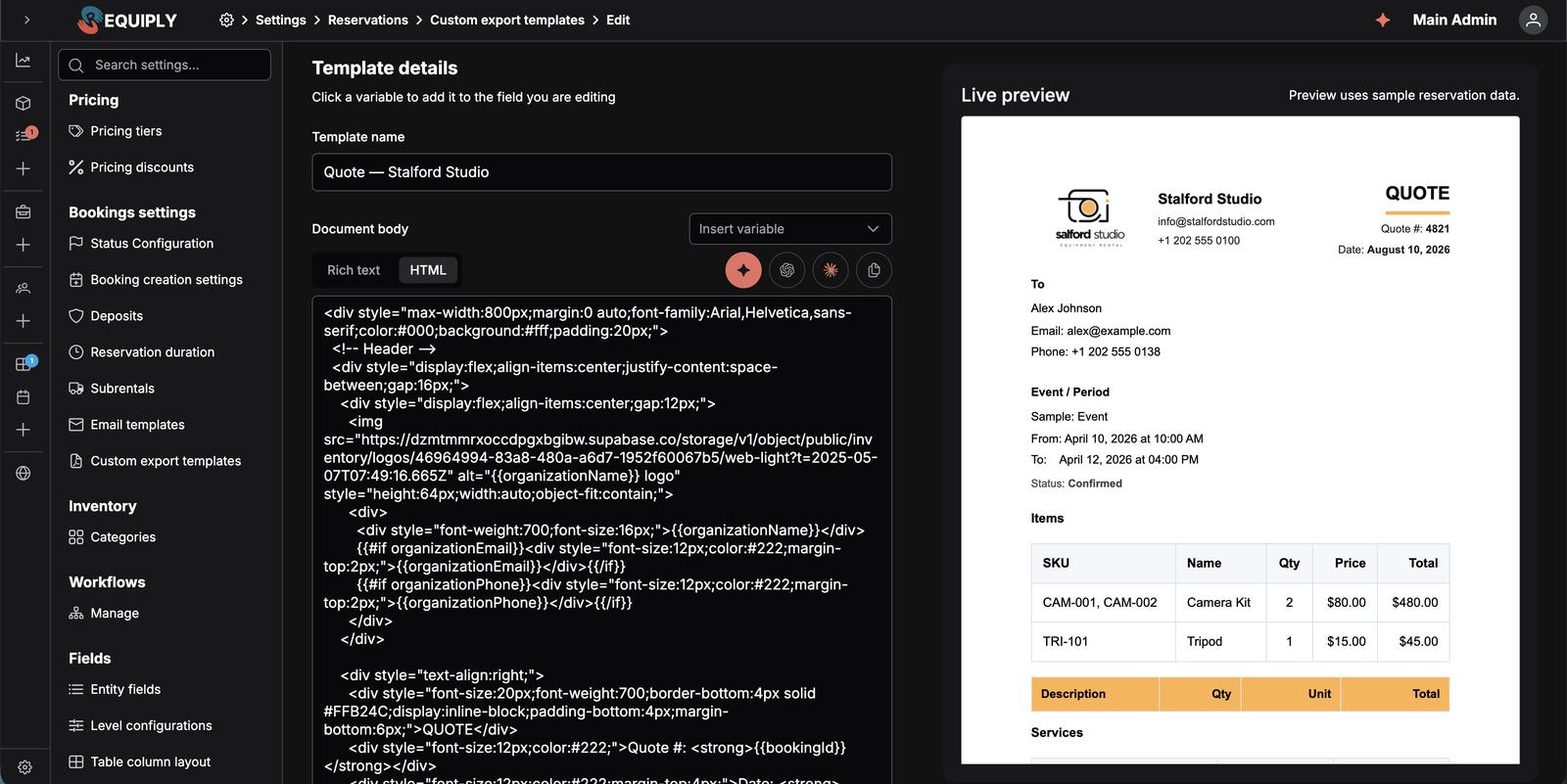
You'll find the new page under **Settings → Bookings → Custom export templates**. Requiply ships **no built-in templates**. You start with a blank list and build exactly the documents your business hands out.
Each template is a name plus a body. The body is plain HTML with `{{variable}}` tokens in it. At export time Requiply swaps every token for the booking's real data and renders the result to an A4 PDF with 15 mm margins.
### What Changed
A new Custom export templates page under Settings → Bookings, with one card per template and a plain-text preview of its body
A dual-mode body editor: rich text for simple pages, HTML mode for full contracts with tables, headings, and signature blocks
A sticky live preview that renders the document on a page-shaped sheet using sample booking data, so you check layout before you ever export
An Insert variable dropdown, searchable by label or token, listing every built-in and custom variable available
Unlimited templates on every plan, with no feature flag to enable
Creating and editing templates is **admin only**. Using them is not. Anyone who can open a booking can generate the document.
**Practical Use Cases:**
- **Rental agreement**: parties, booking period, equipment table, charges, deposit, responsibilities, signature lines
- **Handover and return act**: condition notes and acknowledgements for both directions of the trip
- **Packing sheet**: an internal picking list for the warehouse team, with no prices on it at all
- **Damage report**: pre-filled with the booking and client details before anyone starts writing
---
## 2. Variables: Everything Requiply Already Knows
A template is only useful if it fills itself. Export templates can read the whole booking.
Built-in tokens cover the client (`{{clientName}}`, `{{clientEmail}}`, `{{clientPhone}}`), the booking (`{{bookingId}}`, `{{bookingStartDateTime}}`, `{{bookingEndDateTime}}`, `{{bookingStatus}}`, `{{bookingTotal}}`, `{{bookingDeposit}}`, `{{bookingTotalCharged}}`), and your business (`{{organizationName}}`, `{{organizationEmail}}`, `{{organizationPhone}}`). `{{documentDate}}` prints today's date in your timezone.
Two tokens are special. `{{bookingItems}}` and `{{bookingServices}}` expand into complete HTML tables with SKU, name, quantity, price, and total columns. Put them on their own line and the equipment list builds itself.
### Conditional Blocks
Export templates support one piece of logic, and it removes a whole category of near-identical templates:
```
{{#if bookingDeposit}}
Security deposit held: {{bookingDeposit}}
{{/if}}
```
The block prints when the variable has a value and disappears entirely when it doesn't. Blocks can be nested. One agreement now covers deposit and deposit-free bookings, delivery and pickup, corporate and private clients.
### What Changed
Around twenty built-in booking, client, and organization variables, all available from the Insert variable dropdown
{{bookingItems}} and {{bookingServices}} insert full tables, with column headers in your organization's language and prices in your currency
{{#if variable}} … {{/if}} blocks keep optional paragraphs out of the documents that don't need them
Text values are HTML-escaped on export, so a client name with a stray angle bracket can never break your layout
Dates and times print in the organization timezone from Date & time settings
---
## 3. Custom Fields Become Template Variables
Requiply doesn't model every field your contracts need. A passport number. A VAT code. A delivery address. A licence number. Now you add them yourself, and they show up in your documents.
Every custom field configured on the **Client**, **Booking**, or **Organization** level is available as a variable, built from the field key with a level prefix:
| Entity level | Token pattern | Example |
| --- | --- | --- |
| Client | `{{clientField_}}` | `{{clientField_passport_number}}` |
| Booking | `{{bookingField_}}` | `{{bookingField_delivery_notes}}` |
| Organization | `{{organizationField_}}` | `{{organizationField_vat_number}}` |
The **Organization** level is new in 1.2.7. Level configurations used to have four tabs (Item, Item Group, Client, Booking) and now has five. Unlike the other levels there is exactly one organization record per workspace, so these fields describe the business itself: VAT number, registration code, legal address, licence details.
You fill them in under **Settings → Organization → Info**, in a new **Additional fields** section below the logos. The section stays hidden until you configure at least one organization-level field.
### What Changed
A new Organization entity level in Settings → Fields → Level configurations, alongside Item, Item Group, Client, and Booking
An Additional fields section on Organization info for the values, saved with the rest of the page
Client, Booking, and Organization fields all appear in the Insert variable dropdown, labelled with their level, for example Passport number (Client)
Custom field variables work in email templates too, not just export templates
Checkbox fields render as a localized Yes or No, multiselect fields as a comma-separated list, and empty fields as nothing at all
There's a new organization **Phone** field as well, exposed as `{{organizationPhone}}`, so your contact number stops being retyped into every template.
**Practical Use Cases:**
- **Legal identity in one place**: store your VAT and registration numbers once on the organization, and every contract prints them correctly
- **Passport and licence capture**: add the field to the client level, fill it once, and your agreement is complete without a second form
- **Delivery instructions**: a booking-level field that flows straight into the handover act the driver carries
---
## 4. One Click from a Booking
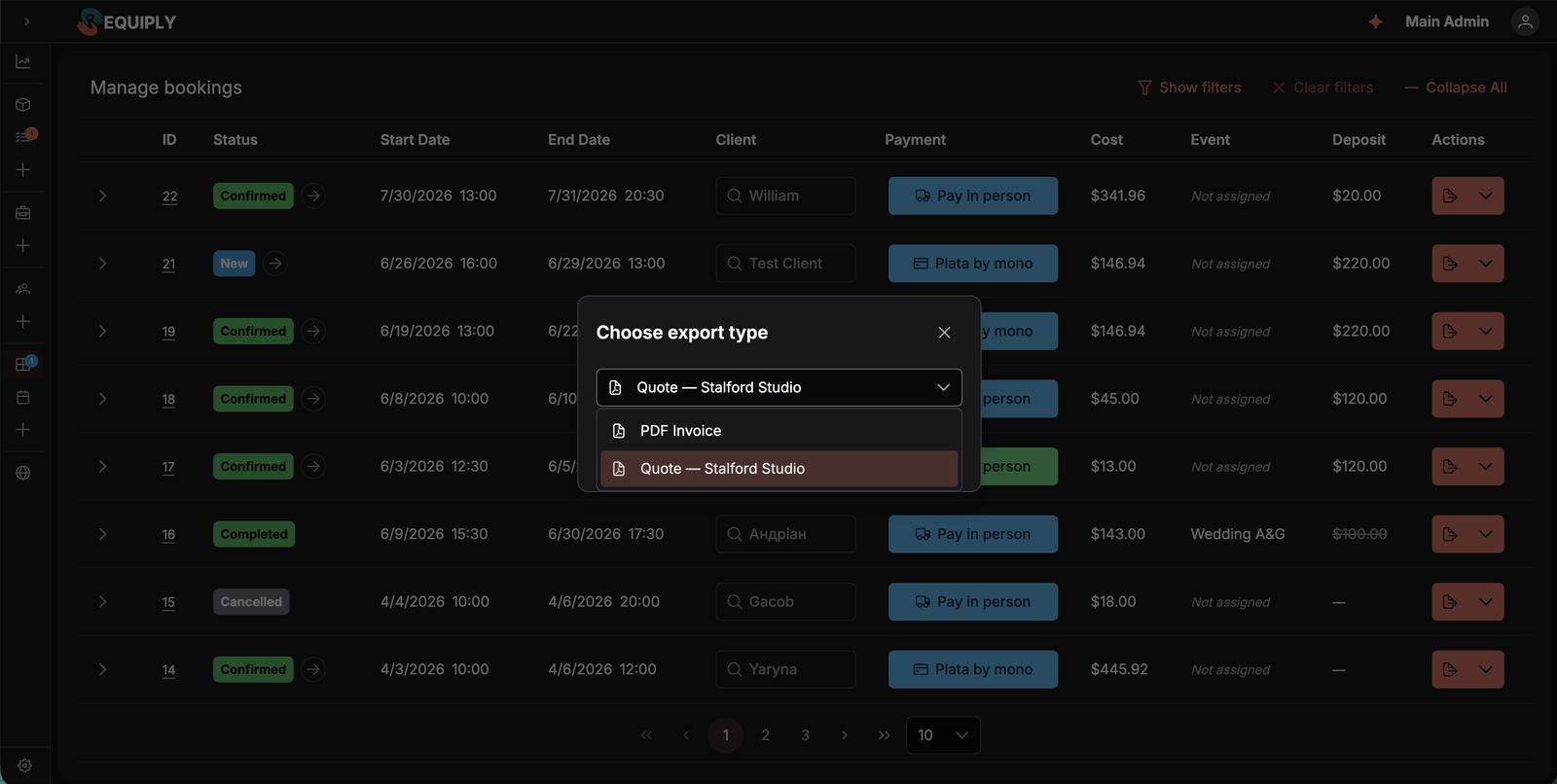
Templates go where the work already happens. The **Export** dialog on a booking, reachable from the row action on **Manage bookings** or from the booking detail page, is now headed **Choose export type**. It lists **PDF Invoice** first, then every template you've designed, by name.
Pick one, confirm, and the filled-in PDF downloads as `-.pdf`. Staff never touch HTML. They pick the document by the name you gave it.
That's why the name matters. Call it `Rental agreement`, `Handover act`, `Packing list`. Something the team recognizes at pickup with a client waiting.
---
## 5. Meet the Requiply Assistant
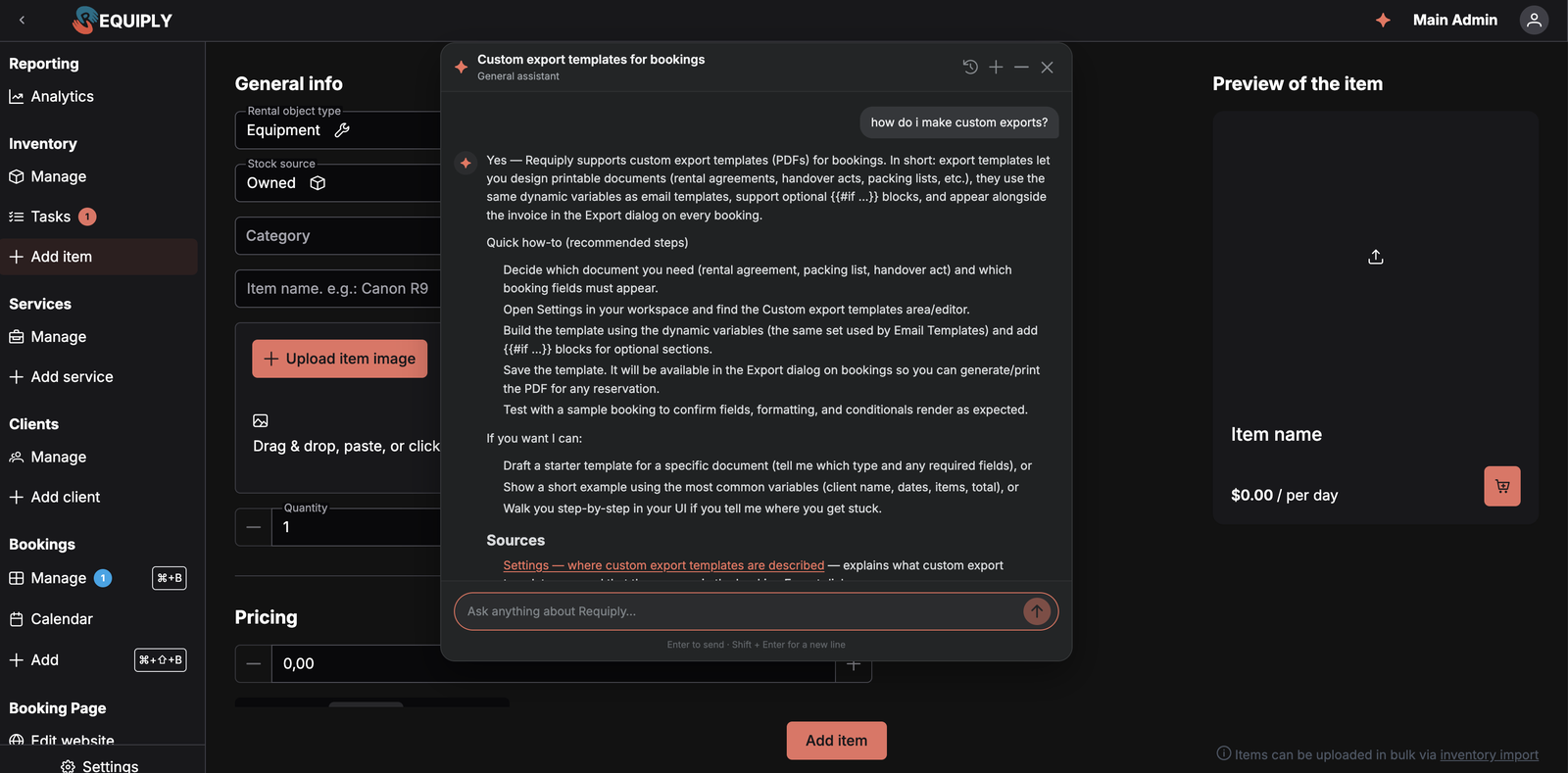
Building an HTML contract from an empty textarea is a lot to ask. So 1.2.7 also ships help.
The **Requiply Assistant** lives behind the star icon in the top bar, on every page of the app and in Settings. Ask it in plain language how something works. It searches the Requiply documentation, reads the relevant pages, and answers with links to them.
It opens as a floating panel over the page you're on, so a question never costs you your place in a half-filled form. Drag it aside, minimize it to its header, or close it and pick the conversation back up from history.
### What Changed
A documentation-grounded assistant available to every signed-in user, in English or Ukrainian, from the star icon in the top bar
Answers stream in with a live trace of what it's doing, collapsing to a summary like Used Knowledge Base · 3 steps when it finishes
A Sources section under every documentation answer, listing the exact pages the answer was built from
Starter prompts for the current mode, so you don't have to phrase the first question yourself
Conversation history with search, plus thumbs up and thumbs down on any answer with an optional comment that reaches our team
One important boundary. The assistant answers from the **documentation**, not from your records. It cannot look up a specific booking, check availability, or read your inventory. For AI that works with your live data, connect Claude or ChatGPT to your organization over MCP under **Settings → Integrations → AI**. Plenty of businesses will want both.
The assistant runs on your organization's AI credit balance, shared with Requiply's other AI features. When credits run out it stops answering until you top up.
---
## 6. The Assistant as a Designer
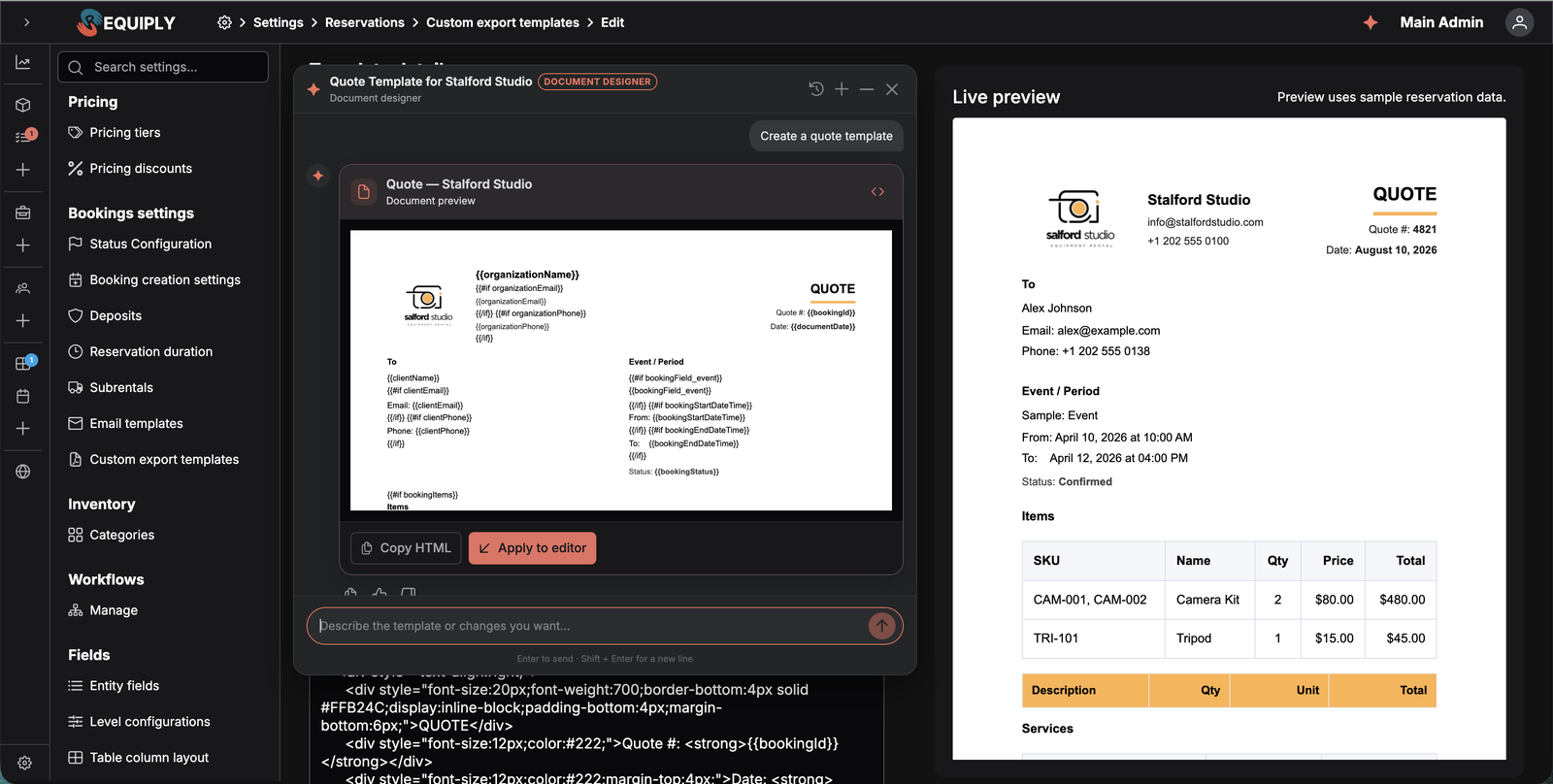
On the email and export template editors, the assistant changes job. A **Create with Requiply Assistant** button opens it in designer mode, and it arrives already knowing three things: the variables available on that page, the draft currently in your editor, and your organization's name, brand color, and logo.
Ask for a rental agreement. Ask for a booking confirmation email. Ask it to translate what you already wrote, or shorten it, or add a cancellation clause. What comes back is not a wall of HTML. It's a card with a rendered preview, a code toggle, copy buttons, and **Apply to editor**.
Applying an email draft fills in the subject and body. Applying a document draft fills in the template name and body and switches the editor to HTML mode. Nothing is saved to your organization until you press **Save** yourself.
### What Changed
Email designer mode on email templates and document designer mode on export templates, opened with Create with Requiply Assistant
Generated drafts arrive as preview cards with Apply to editor, not as raw markup to copy and paste
The assistant uses only the variables that exist in the editor it was opened from, and keeps every token exactly as written
Drafts pick up your organization's name, brand color, and logo, so they come back looking like your business
Starters for the common documents: draft a rental agreement, draft a handover act, improve the current document, translate the current email
The older AI buttons are still there. **Open in ChatGPT**, **Open in Claude**, and **Copy prompt** open an external model with a prompt that explains every Requiply variable. Those remain copy-and-paste round trips. Only the Requiply Assistant writes back into the form.
**Practical Use Cases:**
- **Your first agreement in an afternoon**: start from the *Draft a rental agreement* starter, apply it, then edit the clauses that are specific to your business
- **A second language**: open your existing template, ask for a translation, and save it as a second template so you keep both
- **Onboarding a new manager**: point them at the star icon instead of writing an internal wiki
---
## 7. Smaller Improvements
Not everything in a release needs a section of its own.
Setup guide hints: while a setup step is still pending, Requiply points at the exact control it expects you to use, for example next to the export button on the bookings table. Dismiss a hint with Got it and it stays hidden on that device
An optional Take Requiply with you step at the end of the setup guide, linking the mobile app on the App Store and Google Play. It is optional and does not affect the trial bonus
Booking emails now render dates and times in your organization's timezone, so a customer abroad still reads your local pickup and return times
Faster app loading and lighter pages across inventory, bookings, and analytics
Clearer validation on the login and registration screens, and a smoother setup flow on phones
---
## Frequently Asked Questions
###
Anything printable that comes out of a booking. Rental agreements, handover and return acts, pickup and packing sheets, damage reports, internal checklists. The body is plain HTML, so the layout is entirely yours. Requiply fills it with the booking's data and renders an A4 PDF.
###
It helps, but it is not required. The editor has a rich-text mode for simple pages, and the Requiply Assistant will write a complete print-ready document from a plain-language description and apply it to the editor for you. Contracts and acts are still best kept in HTML mode, because the rich-text editor simplifies markup it does not recognize.
###
Yes. Create the field under Settings → Fields → Entity fields, attach it to the Client, Booking, or Organization level under Level configurations, and it appears in the Insert variable dropdown as {{clientField\_…}}, {{bookingField\_…}}, or {{organizationField\_…}}. The same tokens work in email templates.
###
No. It answers from the Requiply documentation and knows the template editor you opened it from. It cannot read a specific booking, check availability, or look up a client. If you want an AI that works with your live data, connect Claude or ChatGPT over MCP under Settings → Integrations → AI. The two are separate on purpose.
###
Never. Apply to editor only fills the form in front of you. The change takes effect when you press Save on the template. If you navigate away from the editor before applying a draft, the button tells you the editor is no longer open and you can copy the content instead.
###
Creating, editing, and deleting templates is admin only. Using them is not restricted: anyone who can open a booking's Export dialog can generate the document. There is no plan limit on the number of templates.
---
## What's Next?
Version 1.2.7 hands you the two halves of the same job. The template engine that turns a booking into your document, and an assistant that writes the first draft of it.
Here's what we're building next:
**Exports beyond bookings.** Custom templates currently start from a booking. The same engine is heading for inventory, clients, and reports, so a supplier list, a client card, or a period report can be a document you designed rather than a layout we chose.
---
**Have questions or suggestions?** Write to us at `info@requiply.com`. We'd especially love to see the first document you build, and to hear which one your business needed most.
**Tags**
- Requiply version
- requiply
- export templates
- custom documents
- rental agreement
- handover act
- pdf
- custom fields
- template variables
- ai assistant
- knowledge base
- email templates
- rental software
## Sitemap
See the full [sitemap](/sitemap.md) for all pages.