---
title: "How to start using the Requiply SDK"
description: "Install @requiply/api-sdk from npm, create a RequiplyClient with a secret API key, and make your first calls to the Requiply public API."
canonical_url: "https://requiply.com/docs/en/developers/how-to-start-using-the-sdk"
---
# How to start using the Requiply SDK
> Install @requiply/api-sdk from npm, create a RequiplyClient with a secret API key, and make your first calls to the Requiply public API.
Create a secret API key under **Settings → Organization → API keys**, install the package with `npm install @requiply/api-sdk`, and create a `RequiplyClient` with the key. Then call its resources, for example `inventory.list()`, `pricing.quote()`, and `bookings.create()`. The SDK needs Node.js 18 or later, or a modern browser.
`@requiply/api-sdk` is the official TypeScript client for the Requiply public API. It works in Node.js, serverless functions, Next.js, Nuxt, and browsers, with typed inputs and responses. This page takes you from nothing to a booking request in your Requiply account in about ten minutes.
## 1. Create an API key
Follow [How to generate an API token](https://requiply.com/docs/en/developers/how-to-generate-an-api-token) and choose **Secret**. Store it in an environment variable:
```bash
REQUIPLY_SECRET_KEY=rq_sk_live_...
```
Building a storefront that runs in the browser? Create a **Publishable** key instead. It can do everything on this page, but bookings must be sent as requests (`asRequest: true`).
## 2. Install the package
```bash
npm install @requiply/api-sdk
```
The package is ESM only. See [Installation](https://requiply.com/docs/en/developers/typescript-sdk/installation) for runtime requirements.
## 3. Create the client and make a first call
```ts
import { RequiplyClient } from '@requiply/api-sdk';
const requiply = new RequiplyClient({
apiKey: process.env.REQUIPLY_SECRET_KEY!,
});
const org = await requiply.org.info();
console.log(org.name);
```
If this prints your organization's name, the key works. A wrong or revoked key throws a `RequiplyError` with `status` 401.
## 4. Find an item and price a quote
```ts
const startDate = '2026-11-10T10:00:00';
const endDate = '2026-11-12T18:00:00';
const inventory = await requiply.inventory.list({ startDate, endDate });
const item = inventory.items[0];
const quote = await requiply.pricing.quote({
startDate,
endDate,
items: [{ groupId: item.id, quantity: 1 }],
});
console.log(item.name, item.availableQuantity, quote.total, quote.currency);
```
Dates without an offset are read in your organization's timezone. Always send a time: a date alone means midnight, which is usually outside [working hours](https://requiply.com/docs/en/guides/settings/organization/how-to-set-working-hours). The quote applies the same rules as the app: [pricing tiers](https://requiply.com/docs/en/guides/settings/pricing/pricing-tiers), the client's discount, and services.
## 5. Send a booking request
```ts
const request = await requiply.bookings.create({
startDate,
endDate,
items: [{ groupId: item.id, quantity: 1 }],
deliveryType: 'pickup',
asRequest: true,
client: { name: 'Sophie', lastName: 'Marlow', email: 'sophie.marlow@example.com' },
});
if (request.success) {
console.log('Booking request', request.reservationOrgId);
} else {
console.log('Not accepted:', request.message);
}
```
The client is matched by email, then phone, or created. A booking Requiply cannot accept, for example on a closed day or with no free units, resolves with `success: false` and a `message` instead of throwing.
## 6. Check it in Requiply
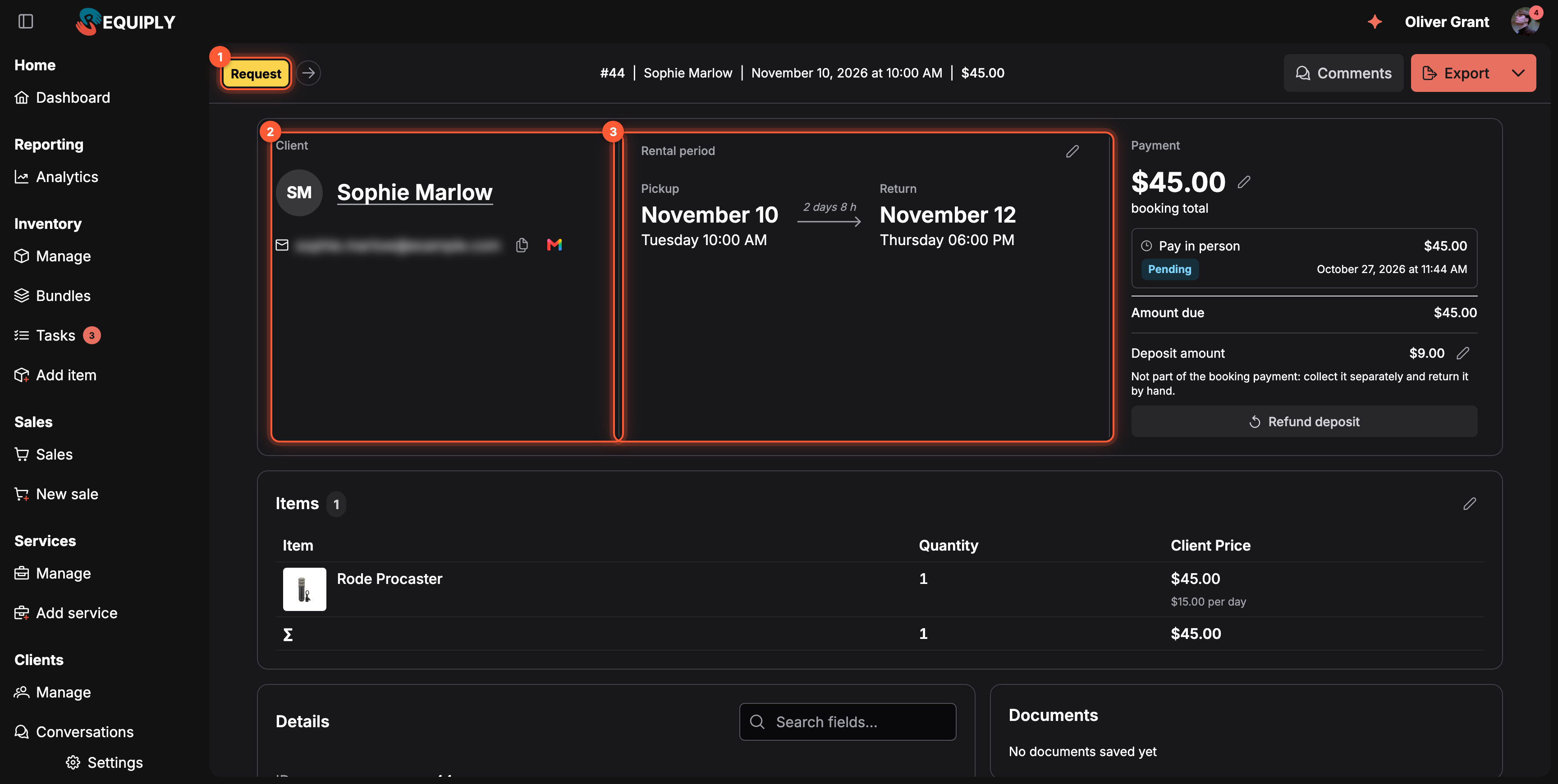
The booking request from the code above, in the web app.
1. **Request**: the status of a booking request. Staff move it on with the arrow next to the tag.
2. **Client**: the client the SDK matched or created.
3. **Rental period**: the dates you sent, in your organization's timezone.
The request also appears in the mobile app, under **Bookings**.
## Common questions
### Should I use the SDK or the REST API?
Use the SDK in JavaScript and TypeScript. In any other language, call the [REST API](https://requiply.com/docs/en/developers/api-reference) with the same key; the SDK is a thin, typed layer over it.
### How do I create a confirmed booking instead of a request?
Use a secret key, leave out `asRequest`, and pass a `paymentType`. See [Bookings](https://requiply.com/docs/en/developers/typescript-sdk/bookings).
### How do I handle errors?
Catch `RequiplyError` and read `status` and `reason`. A `429` carries `retryAfter` in seconds. See [Error handling](https://requiply.com/docs/en/developers/typescript-sdk/error-handling).
### Is there a sandbox?
No. Every key works on real data, so test against a demo organization. See [No test mode](https://requiply.com/docs/en/developers/authentication-and-api-keys#no-test-mode).
## Next steps
- [Quick Start](https://requiply.com/docs/en/developers/typescript-sdk/quick-start): a server and a storefront example side by side.
- [SDK resources](https://requiply.com/docs/en/developers/typescript-sdk#resources): every method, by resource.
- [Examples](https://requiply.com/docs/en/developers/examples): patterns for storefronts and integrations.
## Sitemap
See the full [sitemap](https://requiply.com/docs/sitemap.md) for all pages.