---
title: "Edit account"
description: "Update a team member's name and move them between permission groups."
canonical_url: "https://requiply.com/docs/en/guides/settings/organization/accounts/edit-account"
---
# Edit account
> Update a team member's name and move them between permission groups.
This page is where you update an existing account: the person's name, and the **permission group** that decides what they can see and do across the web and mobile apps.
You reach it from **Settings → Organization → Accounts** through the **Edit** entry in an account row's actions menu. New accounts are not created here: use **Add Account** on the [Accounts](https://requiply.com/docs/en/guides/settings/organization/accounts#inviting-a-team-member) page, which sends the person an invitation so they can set their own password.
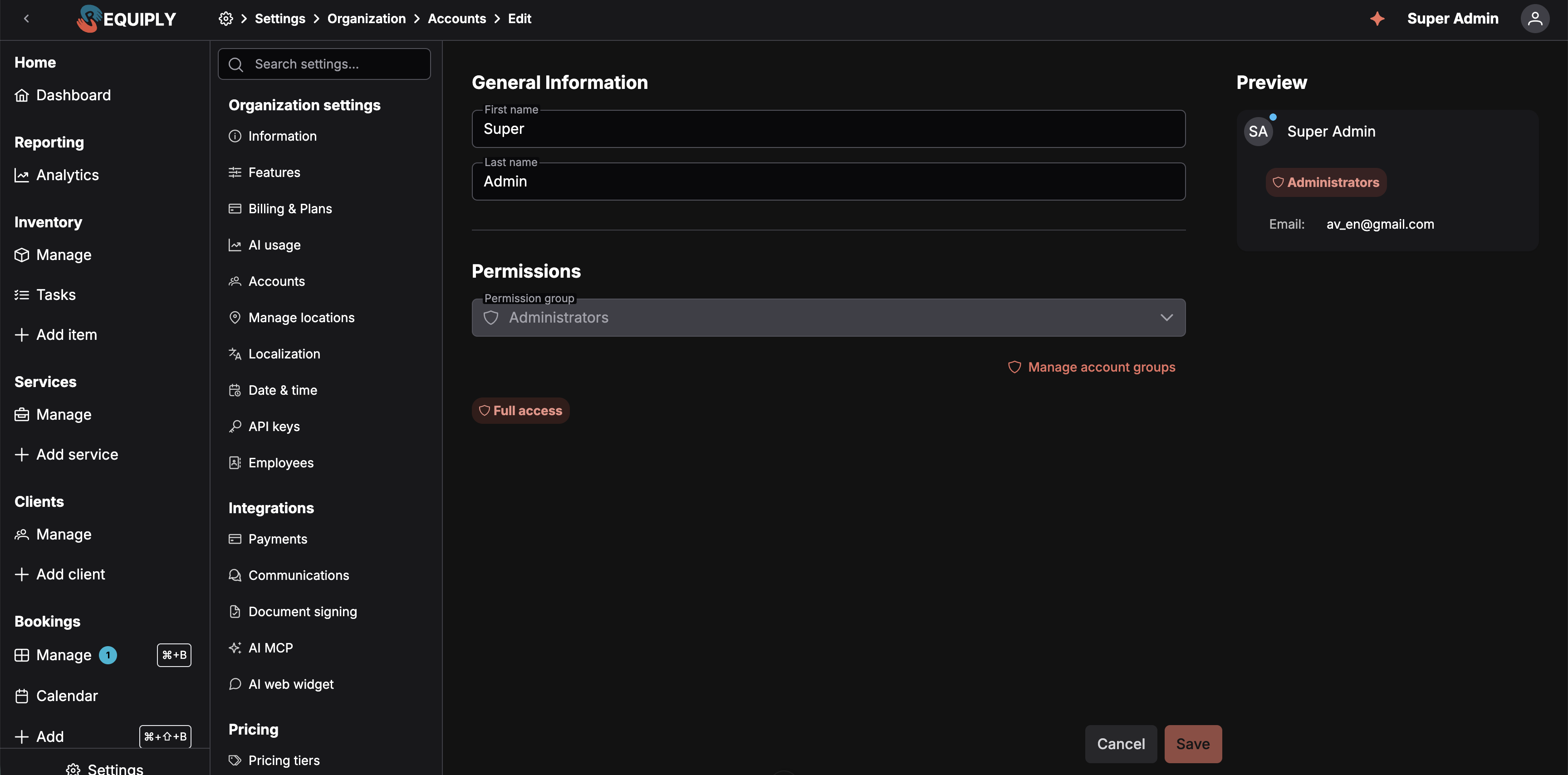
The account form carries no permission toggles of its own. Everything the person can do comes from the group named in **Permission group**.
The form has two sections, **General Information** and **Permissions**, with a live **Preview** card on the right showing how the account will appear in the [Accounts](https://requiply.com/docs/en/guides/settings/organization/accounts) table: avatar, name, group tag, and email.
## General Information
### First name / Last name
The person's display name, split into two fields. Both appear together in the accounts table and anywhere the person is referenced across Requiply. Editable at any time.
For an account whose invitation is still **pending**, the two fields are replaced by the note *"The name will be set by the user when they accept the invitation."* You can still change the group below.
### Email
Not shown on this form. The email cannot be changed once an account exists. It appears on the preview card and in the accounts table. To move a person to a different address, delete the account and send a new invitation.
## Permissions
### Permission group
The single control that decides this person's access. Pick any group in the organization, including **Administrators**. Underneath the selector, a **summary of the selected group's permissions** updates as you change it, so you can see what the person will get before saving.
There are no per-account permission toggles. A **Manage account groups** link sits under the selector: if no existing group is the right fit, follow it to [Permission groups](https://requiply.com/docs/en/guides/settings/organization/accounts/permission-groups), build one, and come back.
Change
When it's allowed
Into Administrators
Anytime.
Out of Administrators
Only when
more than one
administrator exists. If this is the organization's only administrator, the selector is disabled: Requiply requires at least one at all times.
Moving someone between groups takes effect immediately. If you change **your own** group, the app reloads your permissions so the navigation matches what you can now reach.
A person's [startup page](https://requiply.com/docs/en/guides/reports/dashboard#choosing-your-startup-page) must be a page they can access. If their new group no longer grants it, they land on the Dashboard instead.
## Deleting an account
Deletion happens from the account row's actions menu on the [Accounts](https://requiply.com/docs/en/guides/settings/organization/accounts#deleting-an-account) page, not from this form. You cannot delete your own account, and the last member of the **Administrators** group cannot be removed.
## Common scenarios
### Correcting a misspelled name
Open the account, fix **First name** or **Last name**, and save. Nothing about the person's access changes.
### Promoting a member to administrator
Change **Permission group** to **Administrators** and save. There is no separate role field.
### Taking Settings away from one person
Do not look for a toggle on this page. Either move them to a group without **Allow access to settings**, or create one under [Permission groups](https://requiply.com/docs/en/guides/settings/organization/accounts/permission-groups). Editing their current group would take Settings from everyone else in it too.
## Sitemap
See the full [sitemap](https://requiply.com/docs/sitemap.md) for all pages.