


What's New in Requiply 1.2.2?
This release opens Requiply up — to your team, to your operating model, and to the wider developer ecosystem. Clients moves out of Settings and becomes a first-class section governed by per-user permissions. Workflows can now notify your team, not just your customers, with a new Send Internal Email action. Booking creation gets a configurable date picker style so the reservation flow matches how your business actually rents — by day or by hour. Reservation duration gains a hard minimum to protect margins on hourly inventory. And the headline change: Requiply now ships a public API in beta, with managed tokens and a stable v1 surface for custom integrations.
1. Clients — Now a Main Menu Section with Per-User Permissions
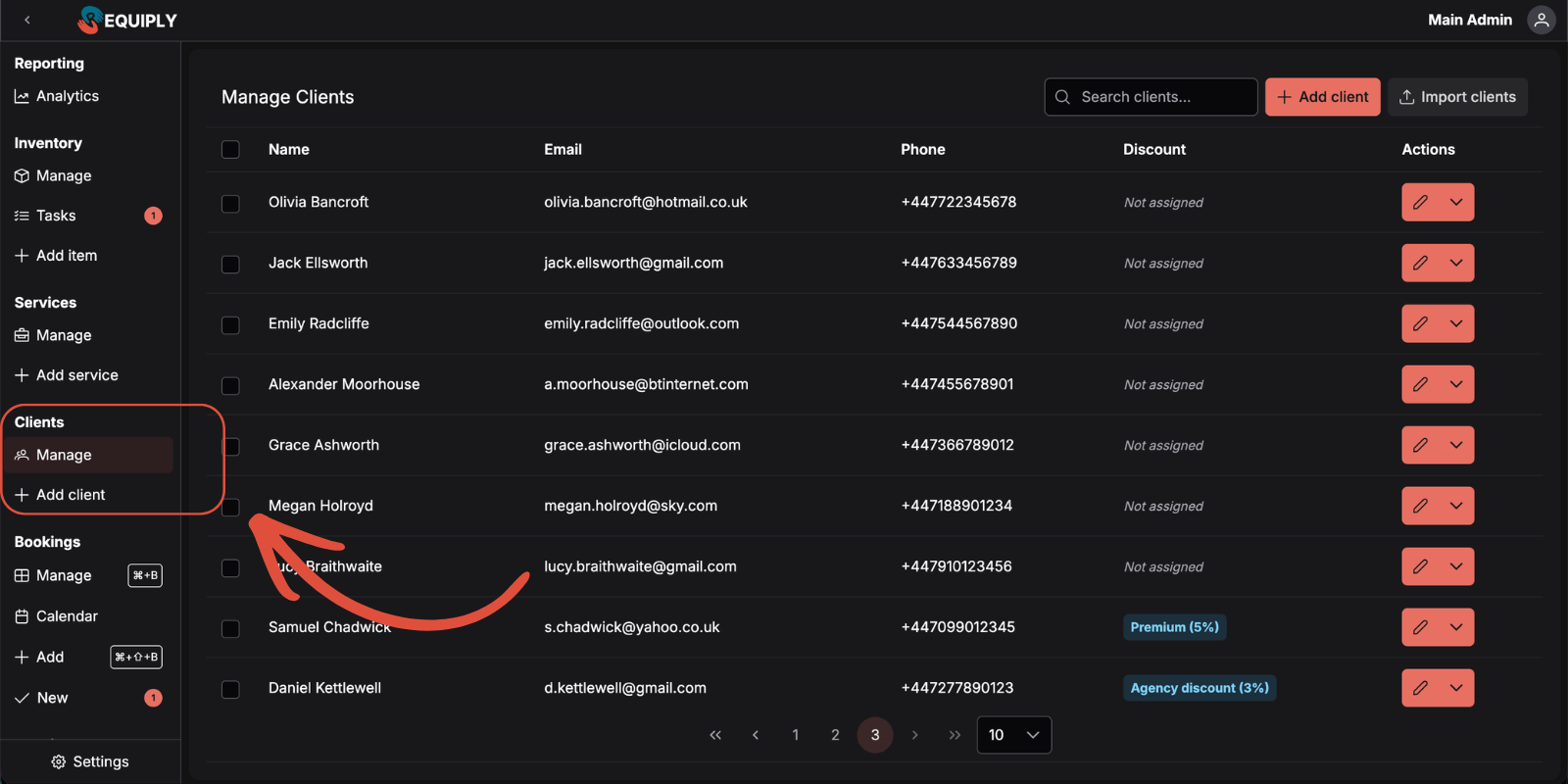
Until now, the Clients (CRM) area lived under Settings and was effectively admin-only. In 1.2.2 it is promoted to a top-level section in the main navigation, right where it is used day-to-day — alongside Reservations and Inventory.
What Changed
Where to Configure
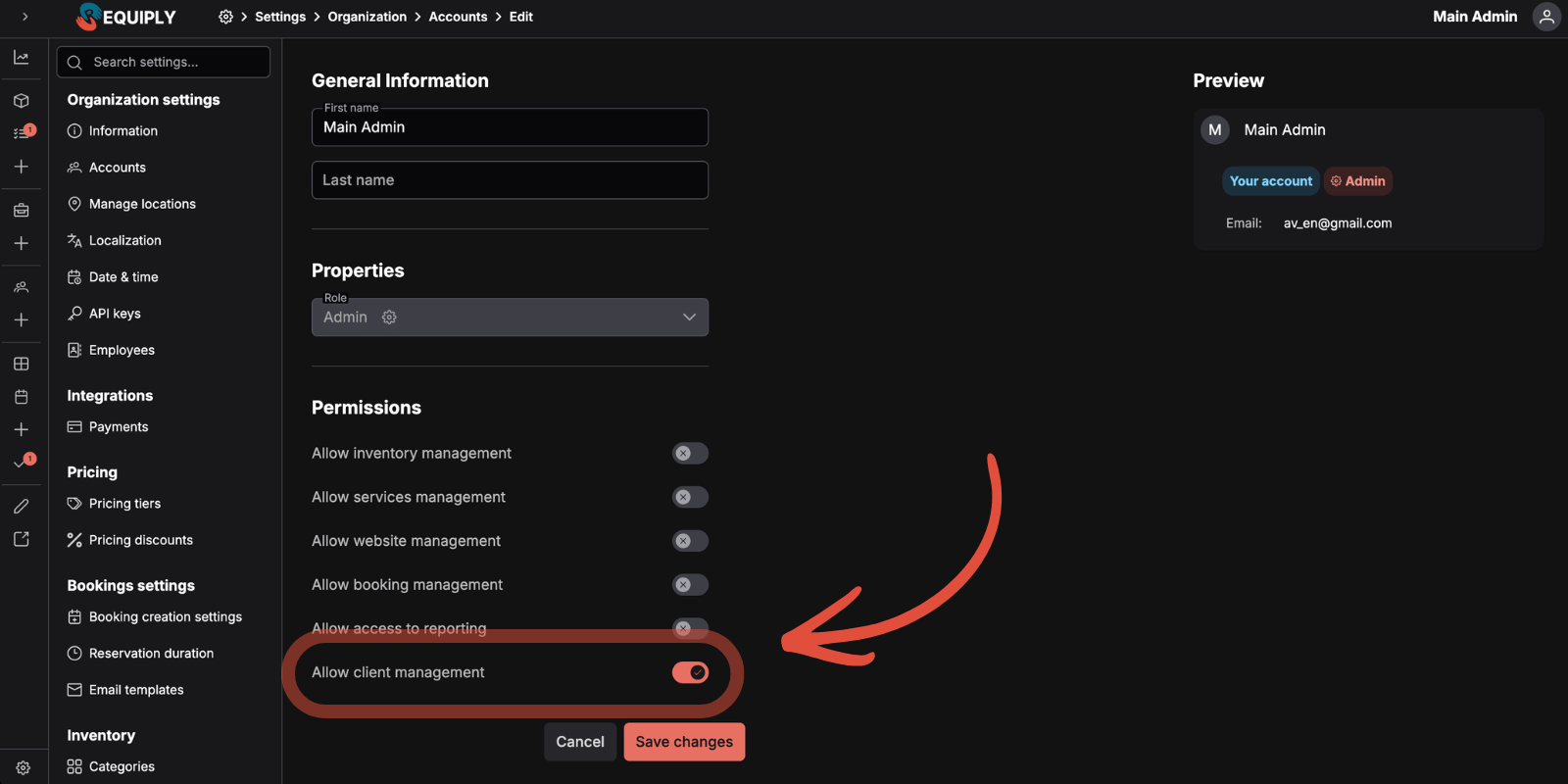
Open Settings → Organization Settings → Accounts, edit a user, and toggle Allow Client Management. The permission joins the existing list (Inventory Manage, Service Manage, Reservations Manage, Reporting Access, Web Site Manage).
When the permission is off, the Clients item is hidden from the side menu and the /clients/* routes redirect to an access-denied page — so the UI matches what the user can actually do.
Practical Use Cases:
- Front-desk staff at a bike rental can now own customer records — adding new clients, editing contact details, looking up history — without being granted admin rights to billing or inventory
- Account managers at an event-equipment company get full CRM access while inventory staff stay out of the customer database
- Dispatchers at a construction-equipment yard see and edit clients but cannot change pricing or settings
2. Send Internal Email — Workflows That Notify Your Team
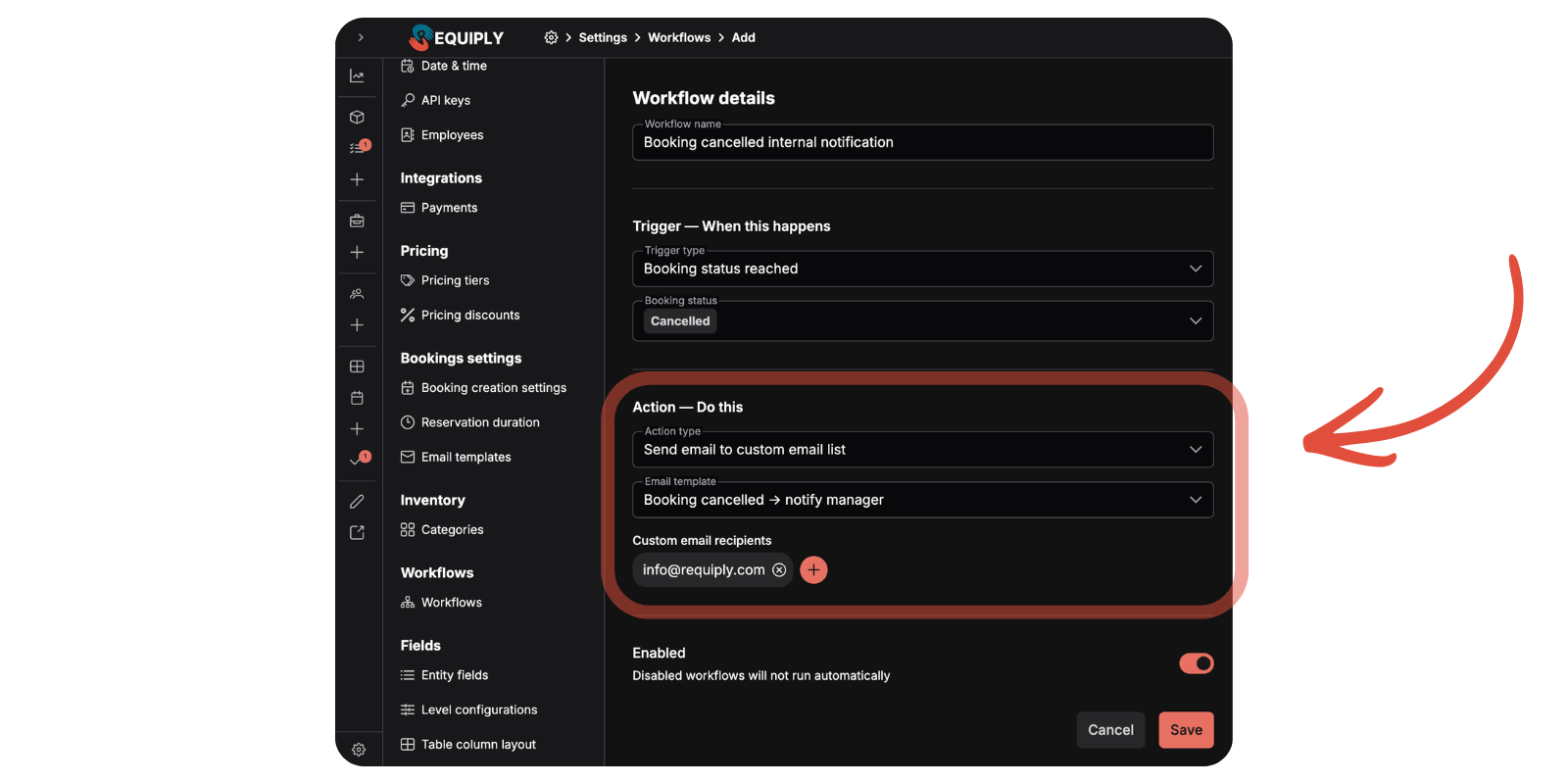
Until now, workflow emails always went to the client. Many teams need the inverse: an internal heads-up when something important happens — a refund, a no-show, a last-minute booking, a high-value reservation. Version 1.2.2 closes that gap with a new action type.
The New Action
Triggers You Can Combine It With
All existing workflow triggers are supported — the action plugs into the engine you already use:
| Trigger | Example use |
|---|---|
| Status reached | Reservation moves to Cancelled — alert the manager instantly |
| Payment status reached | Payment becomes Refunded or Failed — ping the owner for follow-up |
| Booking created | A small-inventory rental gets a new public booking — owner is notified the moment it lands |
| Relative time reached | 24 hours before booking start — operations manager gets a prep reminder |
Configuration
Open Settings → Workflows → Add Workflow (or edit an existing one), pick a trigger, then select the Send Email to List action. Choose an email template, add one or more recipient addresses, save.
Practical Use Cases:
- Boutique car rental: When payment status flips to Refunded, automatically email the owner so refunds never go unnoticed
- Photography studio: When a same-day booking is created from the public site, the studio manager gets an instant heads-up so they can prep the space
- Construction equipment yard: 24 hours before each booking start, the dispatcher receives a digest so loading is queued the night before
- Event rental: When a high-value reservation moves to Cancelled, sales and operations both get notified so the slot can be re-marketed quickly
3. Booking Creation Settings — Pick the Date Picker That Matches Your Model
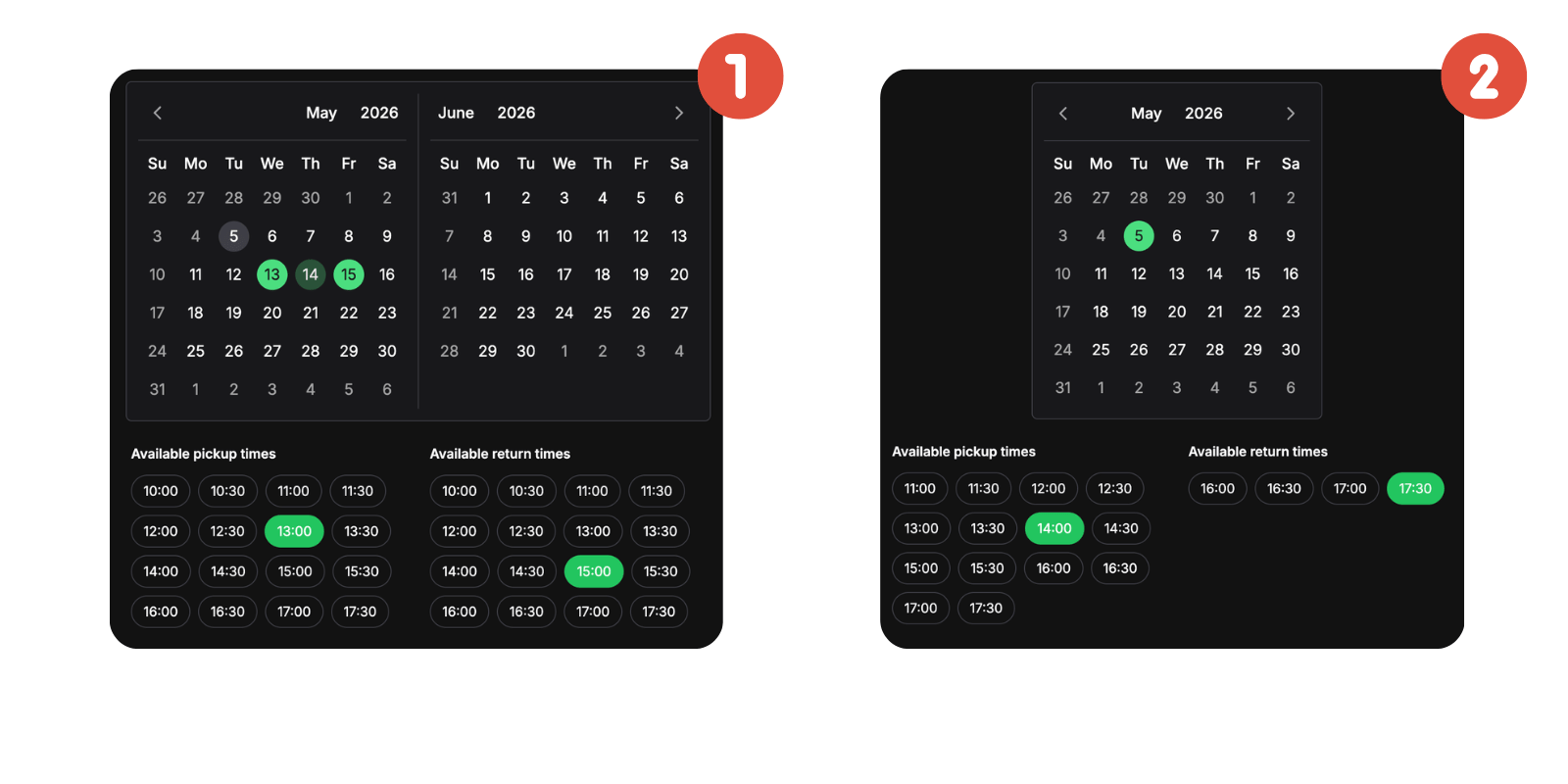
Different rental businesses think about time differently. A car rental cares about days. A studio cares about hours within a day. The booking flow now adapts to your model.
What Changed
A new settings page, Booking Creation, lives under Settings → Reservations → Booking Creation. Its main option, Date Picker Type, lets you pick how customers (and your staff) select dates and times.
The Two Picker Styles
Where the Setting Applies
Practical Use Cases:
- Vehicle rental: Keep the range picker — pickups and drop-offs naturally span multiple days
- Recording studio: Switch to single-day — clients book a Saturday from 14:00 to 18:00 in one clean step instead of awkwardly entering the same date twice
- Walking tour operator: Single-day picker fits perfectly — pick a date, choose the 10:00 or 14:00 slot
- Hourly meeting room rental: Single-day picker keeps the booking flow short and keeps customers from accidentally booking across midnight
4. Minimum Reservation Duration — Protect Your Margins
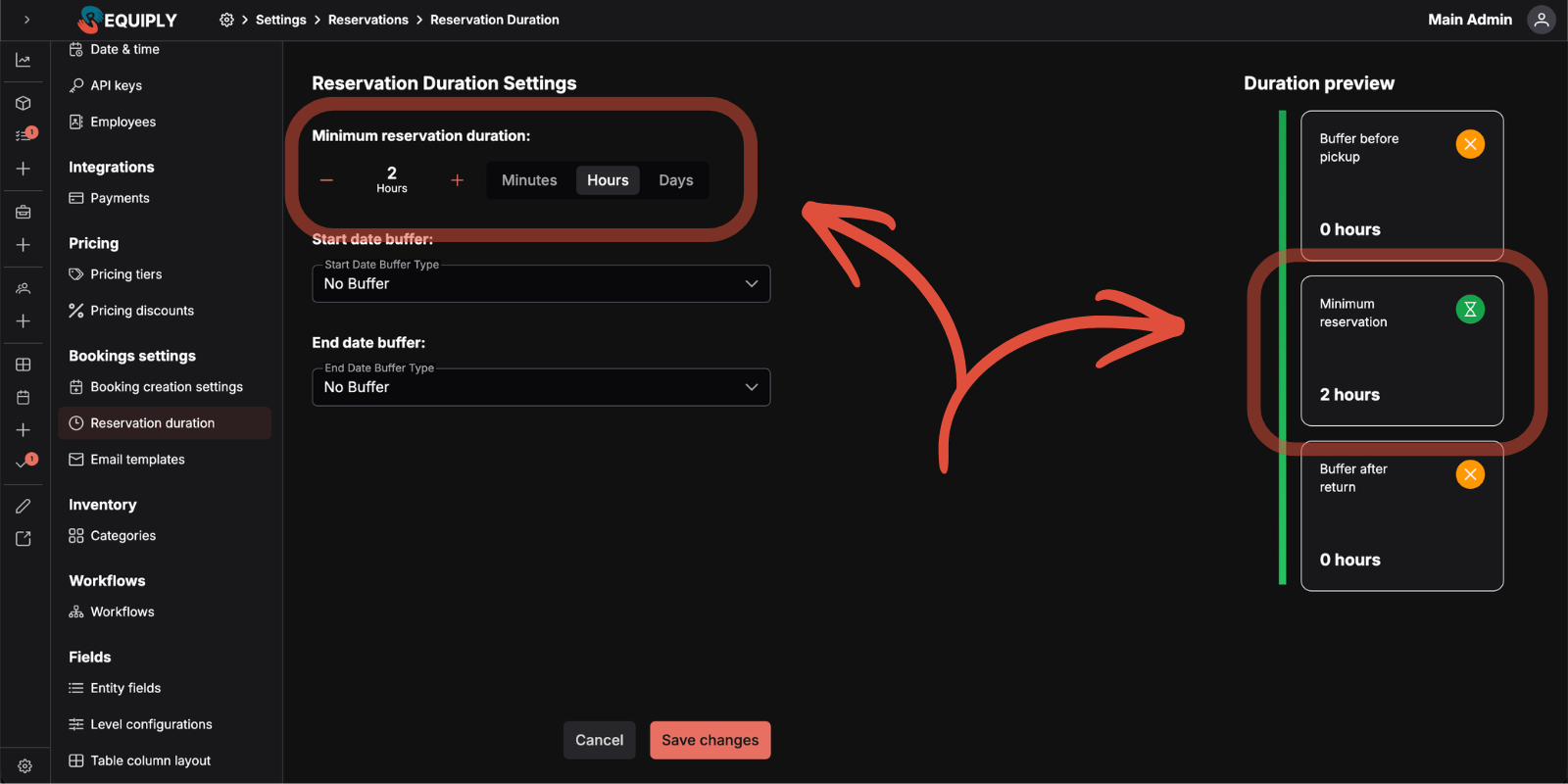
The Reservation Duration settings page gains a new control: a hard floor on how short a booking can be.
What Changed
Why It Matters
Without a minimum, customers were able to book unprofitable 15-minute slots on hourly inventory, or even zero-duration reservations through edge-case flows. Setting a floor protects margins and matches how most rental businesses actually price their offerings.
Practical Use Cases:
- Recording studio: Set a 2-hour minimum so the studio is never booked for an unprofitable 30-minute slot that still requires a full setup
- Yacht charter: Set a 4-hour minimum to match the smallest commercial slot you actually price for
- Co-working day pass: Set a 1-hour minimum so a stray click cannot create a 5-minute reservation
- Equipment rental: Keep the 1-day default to mirror the existing pricing structure with no reconfiguration needed
5. Public API (Beta) — Build Your Own on Top of Requiply
The biggest change in 1.2.2: Requiply now ships with a public, documented HTTP API. It is in beta — endpoints and payloads are stable for production use, but we may add fields and (rarely) introduce versioned changes during this period.
New Settings Page: API Keys
Open Settings → Organization Settings → API Keys (admin only). Create, name, rename, and revoke keys at any time.
Authentication
All public endpoints sit under /api/public/v1/… and accept a Bearer token:
Authorization: Bearer rq_sk_live_xxxxxxxxxxxxxxxx
Endpoints Available in v1
Rate Limiting
100 requests per 60-second sliding window, per key. Exceeded calls return HTTP 429 with a Retry-After header.
What It Unlocks Today
Where We're Taking This Next
This API is the foundation for our broader developer story. The roadmap from here:
Why This Direction
At Requiply, we believe the future of business software is not a single closed website builder that everyone has to bend to. It is a stable, well-documented backend that takes responsibility for the hard parts — availability math, payments, scheduling, compliance — and a thriving layer of AI-assisted tools on top, where owners and developers can compose beautiful, custom experiences in hours instead of weeks. Today's release is the first deliberate step toward that world.
Frequently Asked Questions
What's Next?
Version 1.2.2 is about opening Requiply up — to your team via permissions, to your business model via flexible booking creation, and to the wider developer ecosystem via the public API. We want to see what you build on top of the API and how internal-email workflows reshape your operations — that feedback will shape where the platform goes next.
Here's what we're continuing to work on in parallel:
MCP server and official SDKs — typed TypeScript and Python clients, plus a Model Context Protocol server so AI agents can act on Requiply data on behalf of operators.
Custom status flows — the ability to define your own booking and payment status names, order, and transitions, so the Requiply workflow matches the way your business actually operates.
More workflow triggers and actions — we're expanding the automation engine: more triggers, branching conditions, and a wider set of actions, so you can automate almost any routine in your rental process.
Additional notification channels — email is just the start. We're planning SMS, WhatsApp, and other channels so you can reach clients the way they actually respond.
Custom domain management — connect your own domain and send emails from your own address, so every automated message lands in the client's inbox with your brand.
Have questions or suggestions? Write to us at info@requiply.com — we're especially interested in hearing what you build with the new public API and which integrations you'd like us to prioritize.
- Requiply version
- requiply
- clients permission
- client management
- workflow actions
- internal email
- booking creation
- date picker
- minimum reservation duration
- public API
- API tokens
- rental software
- booking management
- developer tools