


What's New in Requiply 1.2.6?
This release is about jobs bigger than your own warehouse. Requiply can now manage supplier-sourced rental stock alongside your owned inventory: maintain suppliers, define subrental products with a margin on top of the supplier price, follow each procurement through its lifecycle, and see exactly what you spend, what you charge, and what you keep.
And when a booking grows into a real project, invoice groups let you divide it into named sections — phases, locations, stages — so the client receives one clean, clearly structured invoice instead of a wall of lines or a pile of separate reservations.
Shipping alongside the release is one more announcement: the official @requiply/api-sdk npm package, a typed client for the public API built for agentic tools like Lovable and Cursor — more on that below.
1. Subrentals — Rent from Suppliers, Sell with Your Margin
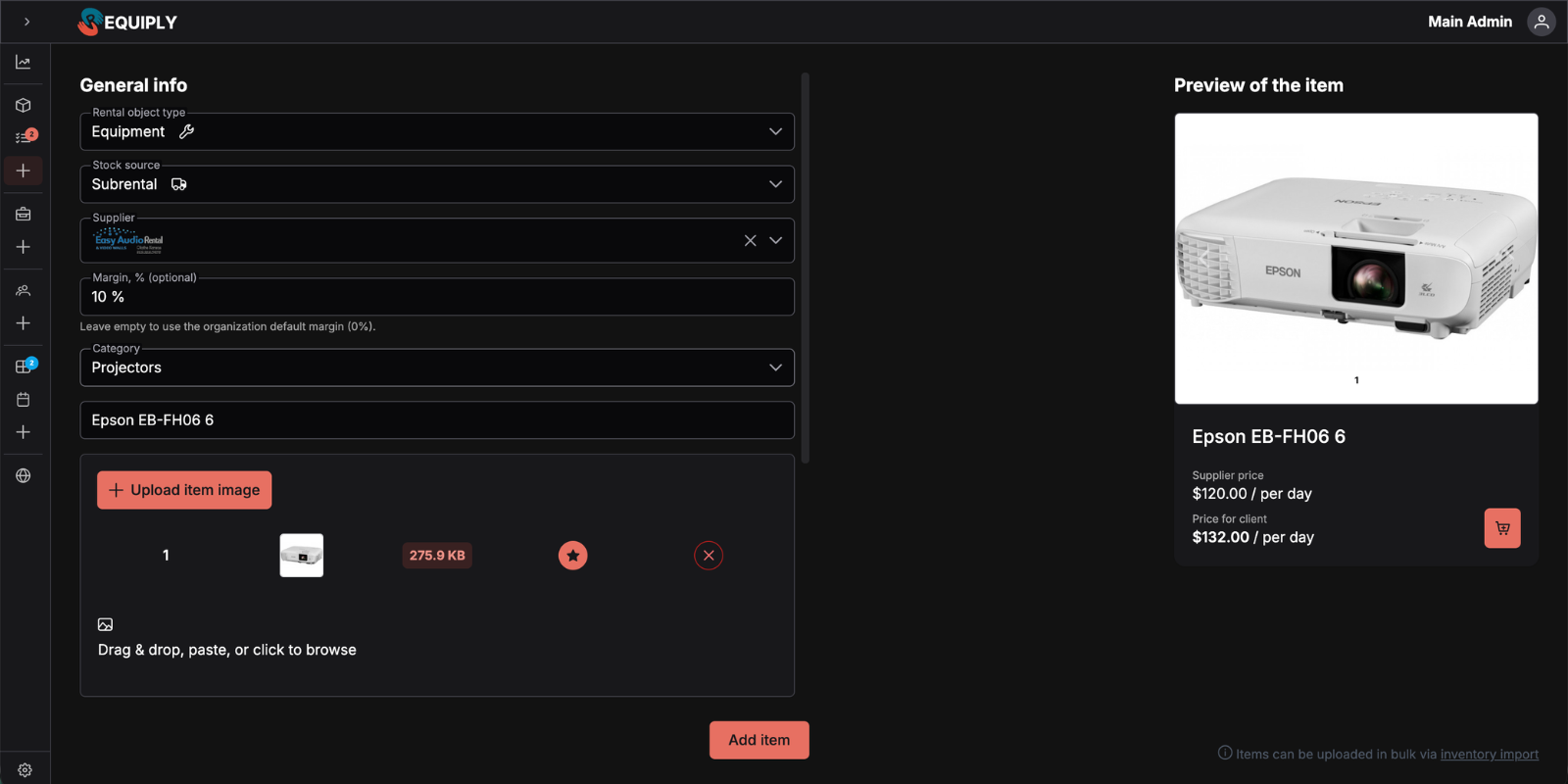
Every rental company eventually gets the booking it can't fully cover from its own stock. Until now that meant tracking supplier rentals in spreadsheets, outside your availability, invoices, and reports. In 1.2.6, subrentals become part of your catalog.
Inventory groups now have a stock source: Owned or Subrental. A subrental product stores its supplier, the supplier rate, an hourly/daily/monthly billing unit, and an optional margin override — while keeping everything you already use: categories, images, SKUs, pricing tiers, and catalog visibility.
What Changed
Where to Configure
Subrentals are opt-in per organization. An admin enables them on the new Settings → Organization → Features page; the default margin and suppliers live under Settings → Reservations → Subrentals. Once enabled, subrental products behave like any other catalog product — including on your website, where customers can book them without ever knowing the stock is supplier-sourced.
Practical Use Cases:
- Peak-season overflow: Your ten heaters are booked solid in December — add a subrental heater backed by a partner's stock and keep selling without buying an eleventh
- Catalog breadth without capital: Offer a generator, a stage, or a specialty lens you don't own; the supplier carries the asset, you carry the margin
- Consistent pricing: Set one organization-wide margin and let every subrental price itself from the supplier rate automatically
2. Subrentals in Reservations — Procurement You Can Actually Track
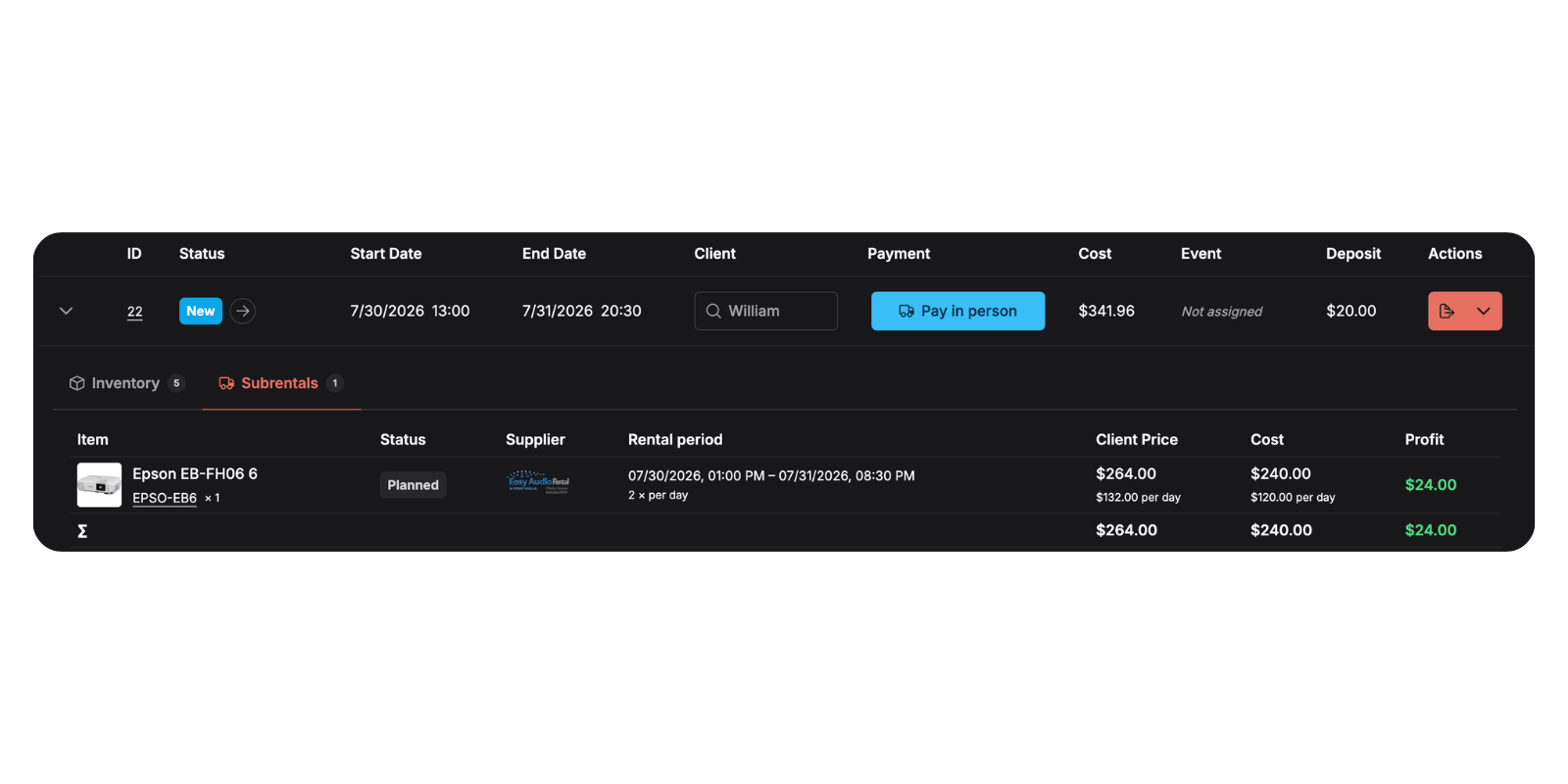
A subrental isn't just a line item — it's a commitment to a supplier that has to be ordered, confirmed, picked up, and returned. Reservations now carry that whole story.
Add a catalog-backed subrental (supplier, rate, billing unit, and margin prefilled) or an ad hoc subrental with a free-text name for one-off gear you'll never rent again. Either way, you set the quantity, supplier rate, billing unit, margin, and procurement period, and see a client-rate preview before saving.
What Changed
The math is deliberately simple: client rate = supplier rate × (1 + margin %), supplier spend and revenue multiply by quantity and billable units, and profit is the difference — visible per line and per reservation.
Practical Use Cases:
- Order at the right moment: Filter for Planned subrentals as the event approaches and move them to Ordered as you call each supplier
- Catch margin leaks: The profit column makes it obvious when a supplier's rate hike has quietly eaten your markup
- One-off gear: A client wants a confetti cannon you'll never own — add it ad hoc, mark it up, and keep it inside the same reservation and invoice
3. Invoice Groups — One Reservation, One Clearly Structured Invoice
Big bookings deserve better than an alphabetical wall of lines. Invoice groups let you divide a reservation into named, ordered sections — Main stage, Day 2, Warehouse B — and assign items, services, and subrentals to them.
What Changed
Here's how the client sees it — ungrouped lines up top, then each named section with its own product and services tables:
Invoice groups organize one booking into one invoice — they are not separate invoices, payment schedules, or supplier purchase orders. The reservation stays whole; the client just finally understands it.
Practical Use Cases:
- Multi-stage events: Group by stage or zone so the client's production manager can check each area against its own section
- Multi-day festivals: One group per day makes it obvious what was on site when
- Construction phases: Foundation, shell, finishing — each phase priced visibly within a single contract invoice
4. Analytics — Profit, Supplier Spend, and Smarter Comparisons
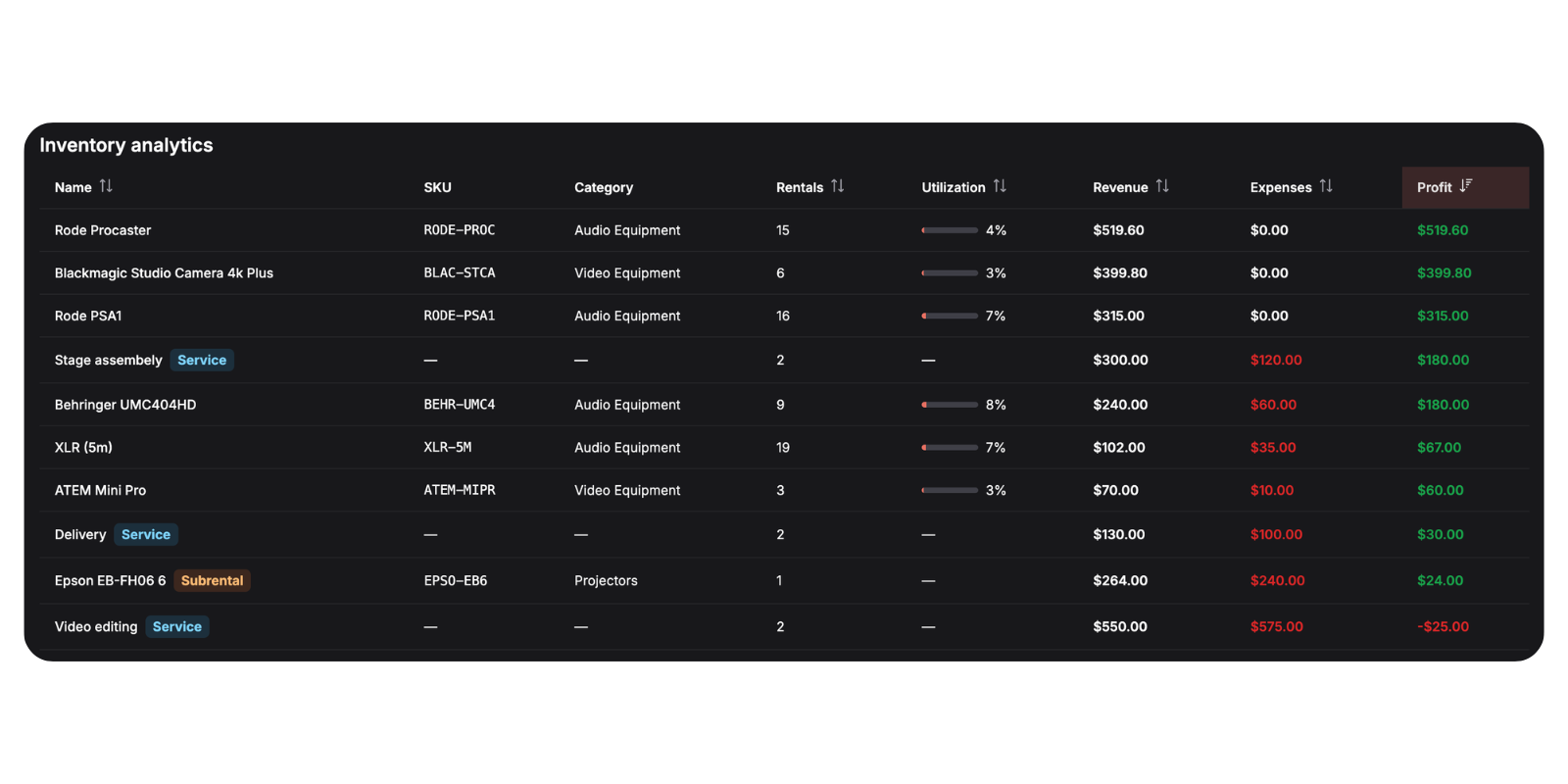
With supplier costs now inside Requiply, analytics can finally answer the question that matters: not just what you billed, but what you kept.
What Changed
Practical Use Cases:
- Is subrenting worth it?: Compare the profit column on subrental rows against your owned stock before deciding what to buy next
- Month-over-month honesty: Revenue up but profit flat? The expense breakdown shows whether supplier spend is the reason
5. Announcing @requiply/api-sdk — the Official npm Package
We promised it in the last release, and here it is: @requiply/api-sdk is now on npm — the official, framework-agnostic TypeScript SDK for the Requiply public API.
It exists for one reason: to make building on Requiply trivially easy — especially with agentic tools. Describe the rental website you want in Lovable, v0, Cursor, or Claude Code, point it at the SDK, and the typed client tells the AI exactly what's possible: inventory, availability, quotes, booking requests, clients, and reports. The hard parts — availability math, pricing, deposits, scheduling — stay Requiply's responsibility; the front end becomes yours (or your agent's) to shape.
What Changed
The Package at a Glance
On npm, @requiply/api-sdk describes itself simply: a TypeScript SDK for building equipment rental websites and apps with Requiply. It's MIT-licensed, ESM-only, runs on Node 18+, ships its own type definitions, and has zero runtime dependencies — the entire client unpacks to under 60 kB. The source lives on GitHub, where issues and suggestions are welcome.
Whether you're a rental business owner prompting Lovable on a weekend, or an agency building client storefronts, the same package covers custom websites, booking forms, customer portals, internal dashboards, and integrations. Start with the developer docs and an API key from your Requiply account.
6. Getting Started with the SDK — Setup & Code Examples
The path from zero to a working storefront is short:
- Create a Requiply account at app.requiply.com/register
- Add your rental inventory, categories, pricing, and availability in Requiply
- Create an API key from your account
- Install the SDK and start building catalog pages, availability search, quotes, and booking requests
npm install @requiply/api-sdk
Storefront Usage — Publishable Key
Publishable keys (rq_pk_...) are safe to use in the browser and cover the public flows: catalog, availability, quotes, and booking requests.
import { RequiplyClient } from '@requiply/api-sdk';

const requiply = new RequiplyClient({
  baseUrl: 'https://app.requiply.com',
  apiKey: 'rq_pk_live_...',
});

// Which equipment is free for the client's dates?
const inventory = await requiply.inventory.list({
  startDate: '2026-07-01',
  endDate: '2026-07-03',
});

// Price the selection before creating a booking request
const quote = await requiply.pricing.quote({
  startDate: '2026-07-01',
  endDate: '2026-07-03',
  items: [{ groupId: inventory.items[0].id, quantity: 1 }],
});
Server Usage — Secret Key
Secret keys (rq_sk_...) belong in server code only and unlock the admin side: booking management, clients, reports, inventory status, and organization summaries.
import { RequiplyClient } from '@requiply/api-sdk';

const requiply = new RequiplyClient({
  baseUrl: process.env.REQUIPLY_BASE_URL ?? 'https://app.requiply.com',
  apiKey: process.env.REQUIPLY_SECRET_KEY!,
});

const { bookings } = await requiply.bookings.list({
  dateFrom: '2026-07-01',
  dateTo: '2026-07-31',
});
Every method accepts request options as its final argument — an abort signal, custom headers, and an idempotencyKey for safe retries.
Frequently Asked Questions
What's Next?
Version 1.2.6 moves the boundary of what a reservation can hold: supplier stock with tracked margins on the inside, and a clearly structured invoice on the outside — and with @requiply/api-sdk on npm, the front end that sells it all can now be built by anyone, in any stack.
Here's what we're building next:
Custom exports — HTML-driven exports for any entity in Requiply. Design your own templates and turn reservations, inventory, clients, or reports into documents that look exactly the way your business needs them — instead of being limited to the built-in layouts.
Have questions or suggestions? Write to us at info@requiply.com — we'd especially love to hear how you source supplier stock today, and what you build first with the SDK.
- Requiply version
- requiply
- subrentals
- suppliers
- invoice groups
- procurement
- margins
- profit
- analytics
- inventory
- api sdk
- npm
- typescript
- rental software