


What's New in Requiply 1.2.8?
Version 1.2.7 was about documents. This one is about the person the documents are for.
Requiply 1.2.8 adds two integrations and two pages, and they all point at the same thing. Telegram delivers your booking notifications for free, with the invoice attached and a pay button underneath. Vchasno takes the rental agreement you generated and gets it signed with a qualified electronic signature. The new client page puts contacts, money, messages, and bookings on one screen. And debt settlement turns five half-paid bookings into one payment link.
Two of these features have full step-by-step guides of their own. This post summarizes what each one does. The guides show every screen.
1. Telegram: Free Notifications From Your Own Bot
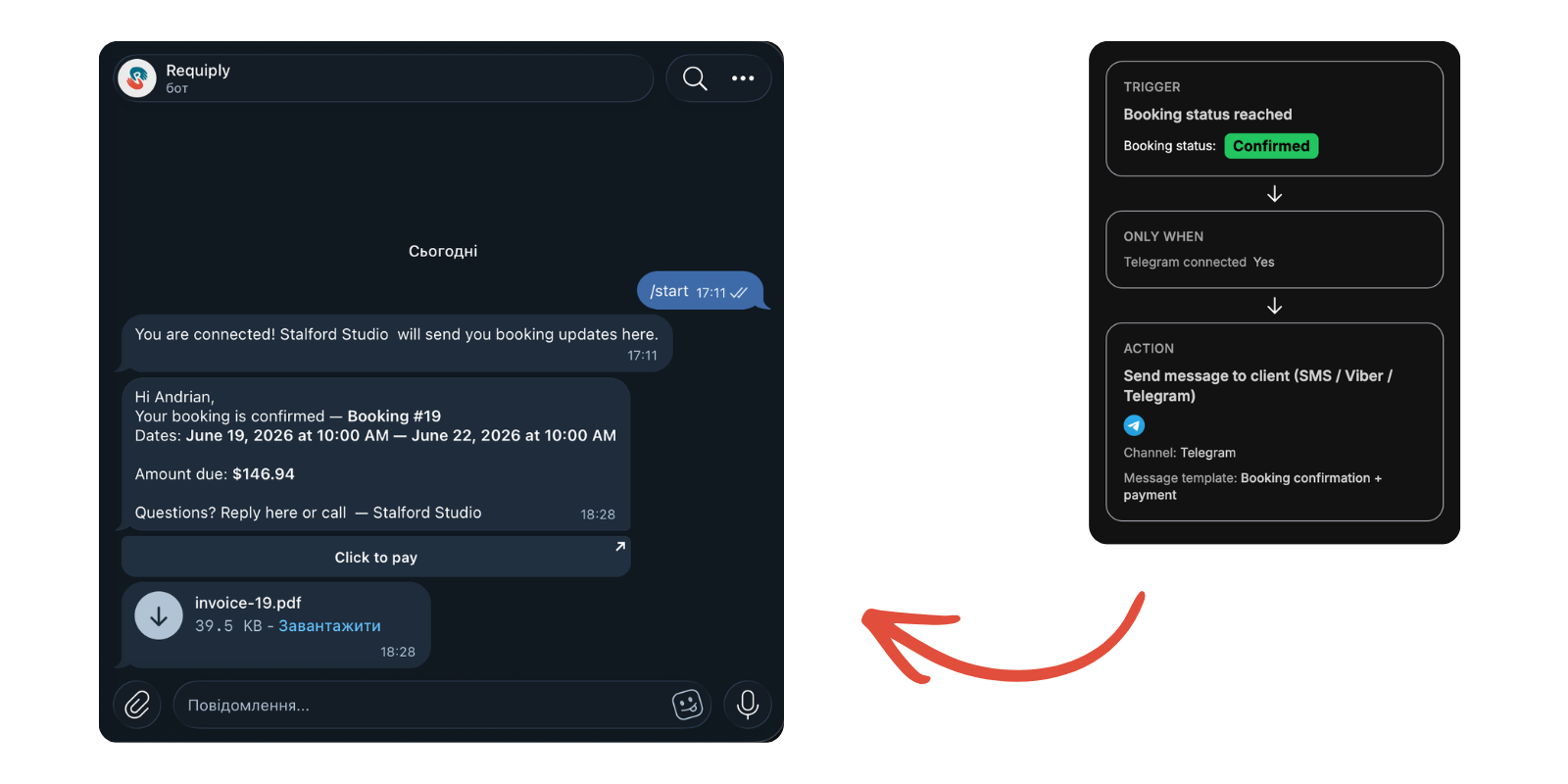
Requiply could already text your clients over SMS and Viber. Both cost money per message, and both are plain text.
Telegram costs nothing and carries everything. Your business creates its own bot with @BotFather, you paste the token into Settings → Integrations → Communications, and from then on every workflow can reach any client who has connected to that bot.
The catch is the connection. A bot cannot write to a phone number, so each client opens your bot once. Requiply gives you two ways to make that happen: a personal invite link on the client's page, or the {{telegramConnectLink}} variable dropped into your booking confirmation email, which quietly onboards every new client without anyone doing anything.
What Changed
Message Templates: Where the Wording Lives Now
Telegram messages can carry things an SMS never could, and those things needed somewhere to live. So the text of an automated message moved out of the workflow and into a new page: Settings → Bookings → Message templates, the messenger counterpart to email templates.
A template declares a format, and the format decides what it can hold:
| Format | What it can contain | Which channels can send it |
|---|---|---|
| Text | Plain text only | Every channel: SMS, Viber, Viber with SMS fallback, and Telegram |
| Telegram | Formatted text, PDF attachments, and up to six link buttons | Telegram only |
| Viber | Plain text up to 1000 characters, an optional image, one action button | Viber and Viber with SMS fallback |
A Telegram template can attach the booking invoice and any of your custom export templates as PDFs, generated at the moment the message is sent. It can carry a Pay here button pointing at {{paymentIntegrationLink}}. The preview panel renders the message exactly as Telegram will show it, attachment and buttons included.
Practical Use Cases:
- Confirmation with the invoice attached: trigger on the Confirmed status, attach the invoice PDF, add a pay button, and the client gets all three in one message
- Contract before pickup: attach the rental agreement from your export templates so the client reads it before they arrive
- Pickup reminders: a relative-time trigger one day out, with the date, the time, and your address
- Payment follow-ups: trigger on a payment status and send a button that goes straight to the checkout
Full setup guide: Telegram Integration in Requiply walks through creating the bot, connecting clients, and building the workflow.
2. Vchasno: Get the Agreement Signed Without Leaving the Booking
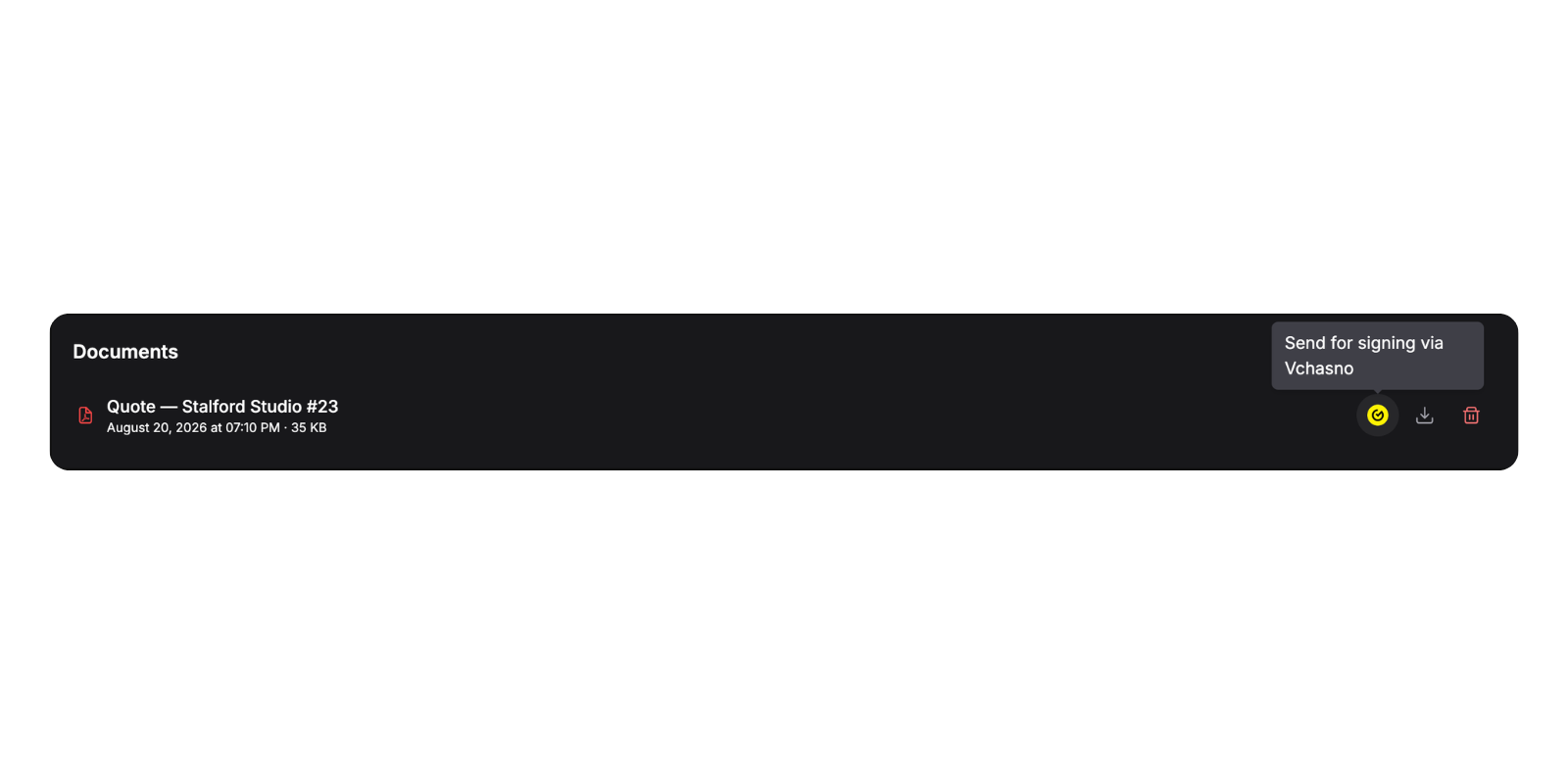
Requiply 1.2.7 taught bookings to produce documents. It just could not do anything with them afterwards. You exported the agreement, emailed it, and chased a signed scan back.
1.2.8 adds Vchasno.EDO under a new Settings → Integrations → Document signing page. Paste your API token, and rental agreements, handover acts, and invoices go out for a qualified electronic signature (КЕП) from the booking they belong to.
Documents Now Belong to the Booking
Signing needed a document to sign, so the Export dialog grew a second button. Quick Download does what it always did. Save generates the PDF, stores it on the booking, and drops it into a new Documents card on the booking's page.
That card is useful on its own, even with no signing provider connected. The exact invoice a client received stops living in someone's Downloads folder. Later price changes do not alter it. Anyone on the team can pull the file that was actually handed over.
What Changed
Your organization signs first, then the document moves to the client. The chip on the booking tells whoever is at the counter whether the paperwork is done. A document can only have one signing in flight, and the send button comes back only if the signing was rejected or ended in error, so a declined agreement can be corrected and sent again while the earlier attempt stays in the history.
Saved PDFs live in private storage scoped to your organization and are downloaded through short-lived links. They are never publicly addressable.
Full setup guide: Vchasno Integration in Requiply covers the token, the Integration plan, and the whole signing flow screen by screen.
3. The Client Page
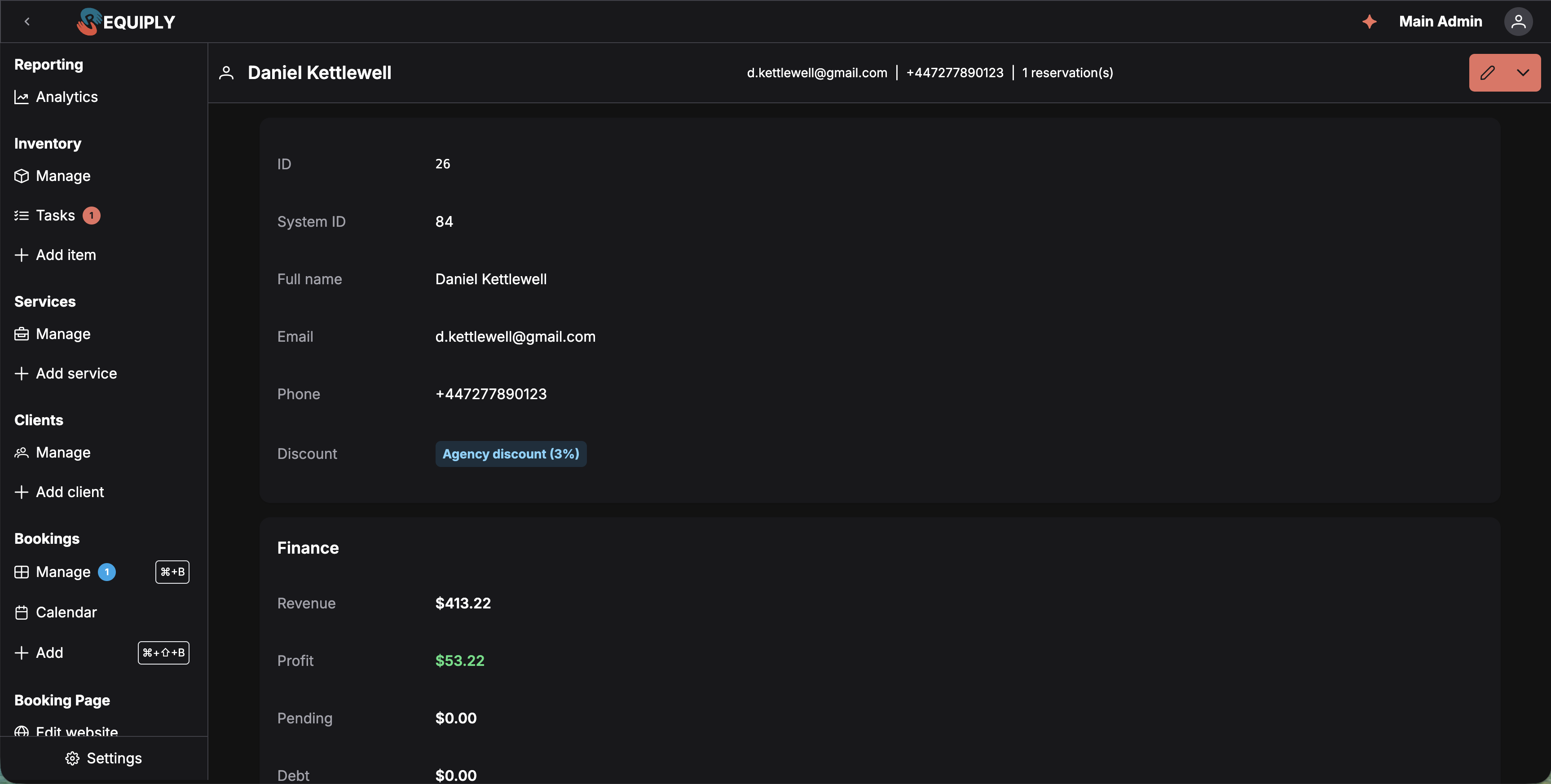
Everything above needed somewhere to land. A client's Telegram state is not a property of a booking. Neither is the money they still owe across six of them.
So clients got their own page. Click the ID tag on any row of Manage clients, or the ID inside the client popover on any booking, and you land at /clients/{id}.
One screen answers the two questions staff actually ask at the counter: who is this person, and do they owe us anything.
What's On It
Details. The contact record: ID, system ID, full name, email, phone, and the assigned pricing discount.
Finance. Four figures, all derived from payment records rather than from booking totals. A booking marked paid in the table but with no settled payment record still counts as debt here, because this card reflects money that actually moved.
| Figure | What it means |
|---|---|
| Revenue | Money actually collected: settled charges, minus refunds, minus any security deposit you are still holding |
| Profit | Revenue minus costs, where costs are employee service payouts plus subrental spend. Green when positive, red when negative |
| Pending | Charges currently pending or processing. Money on its way but not settled |
| Debt | Each booking's billed total minus what was collected on it, floored at zero and summed. Red when above zero |
Messaging. The client's Telegram state with their handle, a Copy invite link button until they connect, and a log of every message Requiply sent them. Each entry carries the template that produced it, the channel, the timestamp, a preview, and a Sent or Failed tag. Failures name the reason in plain language, which makes this the fastest way to answer "did the client actually get the reminder?"
Additional fields. Any client-level custom fields you have configured, with values.
Bookings. Every booking this client ever made, split into five tabs with count badges: Overdue, Today, Active, Upcoming, History. The page opens on the first tab that has rows. If it opens on Overdue, that client has something outstanding and nobody had to go looking.
What Changed
Requests, cancelled bookings, and fully refunded bookings never contribute debt. A fully refunded booking is treated as called off, so re-billing the client for it would be wrong.
Practical Use Cases:
- A regular walks in wanting to rent again: the Debt row tells you whether to take money first, and the Overdue tab shows what they still have not returned
- Chasing a late return: the Overdue tab lists only bookings whose status has not released availability, with a day count on each
- Deciding whether a client is worth the trouble: compare Revenue against Profit. A big gap means their bookings lean on subrented gear and paid services
4. Debt Settlement: One Payment for Everything Owed
A client with one unpaid booking is a payment link. A client with five is an afternoon of arithmetic.
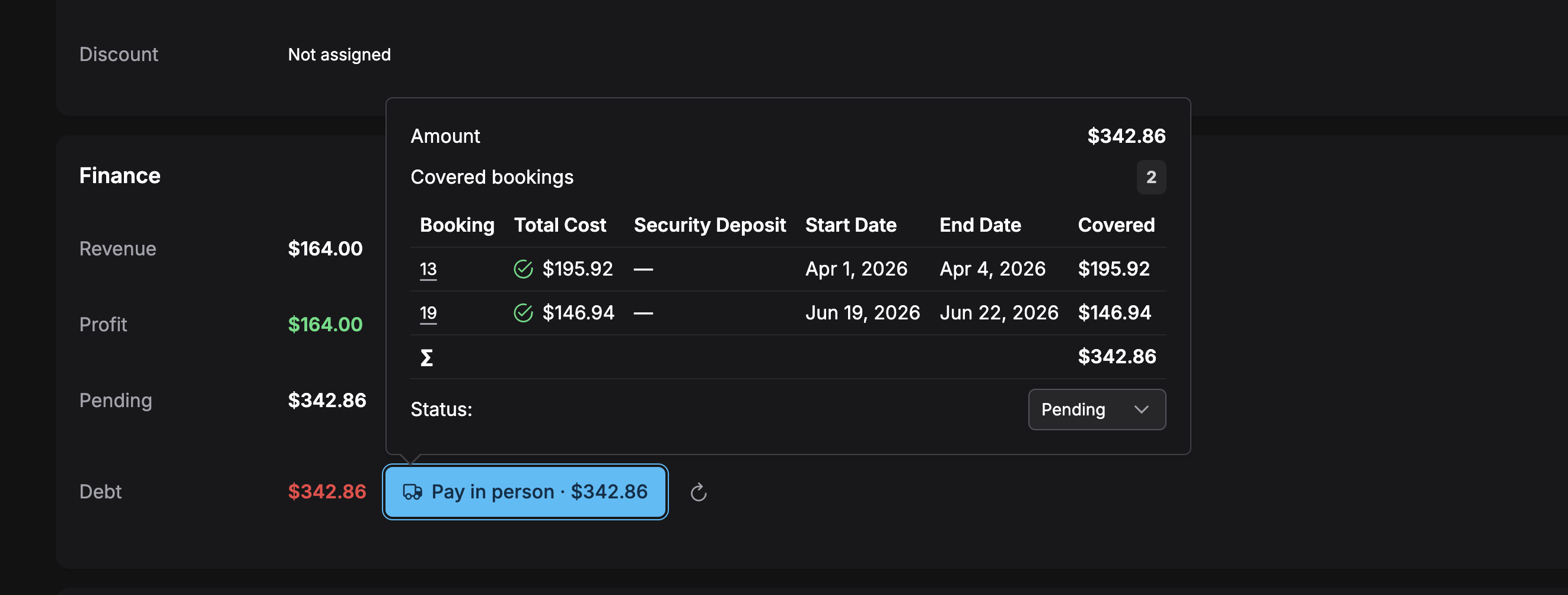
When the Debt row on the Finance card shows anything above zero, a Settle debt button appears next to it. It collects everything the client owes across all of their bookings into a single payment, and settles the underlying booking records for you when that payment lands.
Choosing What Goes In
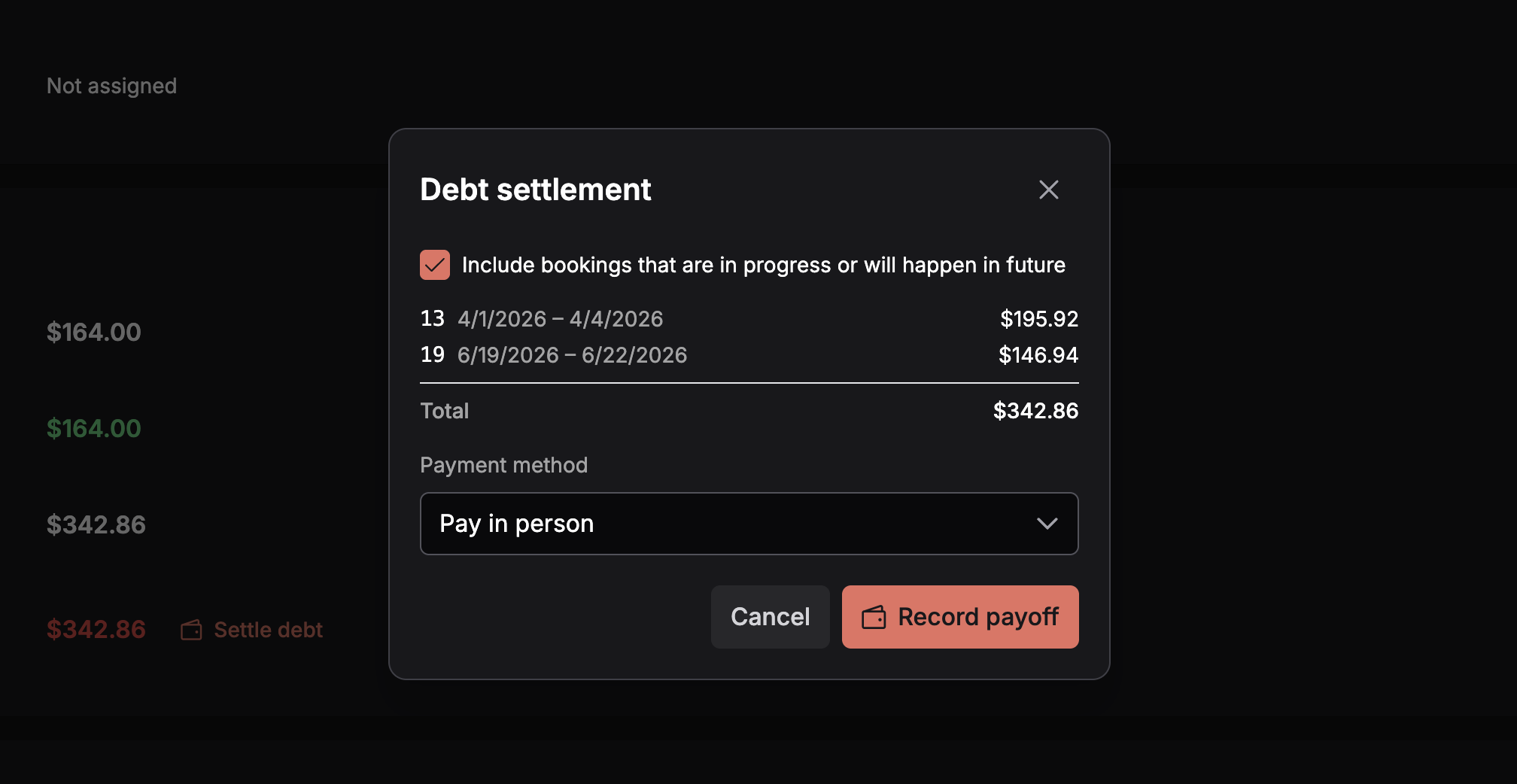
The dialog lists every payable booking with its dates and the amount this settlement would collect from it. Requiply leaves out what should never be billed: requests, cancelled bookings, fully refunded bookings, bookings already settled, and bookings that have not started and carry no payment records at all.
One checkbox, off by default, controls the rest. Include bookings that are in progress or will happen in future decides whether rentals whose end date is still ahead join the settlement. Leave it off to collect only what is genuinely overdue. Tick it to clear the client's whole balance before their next pickup. The list and the total update live.
Security deposits are handled by whether the rental has started:
| Booking | How it is collected | Deposit |
|---|---|---|
| Already started or ended | The exact outstanding debt. Stale open, failed, and cancelled records on the booking are superseded by one fresh record for the residual | A deposit that was never collected is dropped. The rental is underway or over, so there is nothing left to secure |
| Not started yet | The booking's existing open records, exactly as they stand | The deposit is still due before pickup, so it is included. The row reads incl. deposit |
Getting Paid
The Payment method dropdown offers the same methods as any booking payment.
Pick Pay in person and the button becomes Record payoff: no online transaction, you mark it completed when the money arrives. Pick an online provider and it becomes Create payment link. Requiply creates a provider-hosted invoice for the whole settlement and stores the link on the payment, ready to copy into a chat.
Stripe, Plata by Mono, LiqPay, and WayForPay all work here, through the payment integration you already connected. If the provider invoice cannot be created, the payoff and every record it made are rolled back, so you never end up with a half-configured payment that looks payable.
What Changed
Only one active settlement can exist per client at a time. Cancelling it reopens the debt and brings Settle debt back. Regenerating it when nothing is left to collect simply removes it, and tells you so.
Practical Use Cases:
- The regular with a tab: leave the checkbox off, record one balance in person, mark it completed at the counter, watch the debt go to zero
- Clearing an account before a big booking: tick the checkbox and one link covers the whole balance, deposits on upcoming rentals included
- They paid one booking directly while the link was outstanding: regenerate, and the new link is for what is actually still owed
5. The Booking Payment Ledger
Booking payments used to be a single button. Bookings that collected money in more than one go had nowhere sensible to show it.
The booking detail page now carries a payment ledger: every payment record on the booking as its own row, with the method, the amount, the status tag, and the timestamp. Paid sits above it with a green check once the booking is settled, and Amount due below it with a button that creates or copies the payment link for whatever is still open.
This is also what makes debt settlement legible after the fact. The records a payoff supersedes show as cancelled in the ledger, and the residual record it created shows next to them.
6. Smaller Improvements
Frequently Asked Questions
What's Next?
1.2.8 gives the client a page, a channel, and a single balance. The next step is making the channel go both ways.
Two-way messaging. Telegram currently carries notifications out. Clients already reply to those messages, and right now nobody sees it. Bringing those replies into the booking they belong to is what we are working on next.
Have questions or suggestions? Write to us at info@requiply.com. If you connect Telegram, tell us how many of your clients pressed Start in the first week. We are curious too.
- Requiply version
- requiply
- telegram
- telegram bot
- message templates
- vchasno
- electronic signature
- edo
- client page
- debt settlement
- payment link
- payment ledger
- rental software