


What's New in Version 1.1.8?
This update brings three major improvements: granular inventory tracking with individual SKUs, a comments system across bookings, items, and tasks, and a full maintenance workflow with expense management.
1. SKU-Based Inventory Management
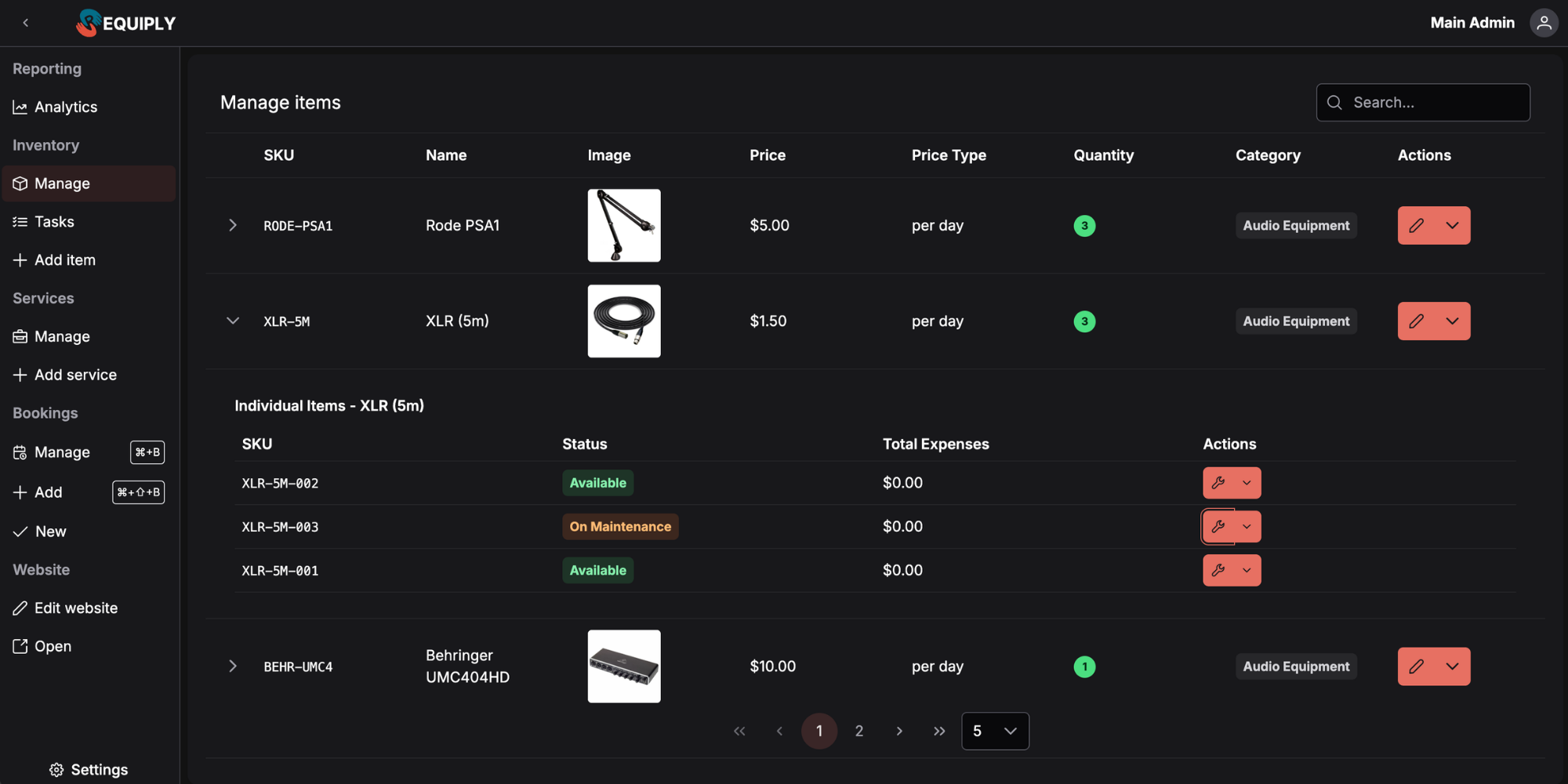
Previously, inventory items were tracked by quantity alone. That's no longer enough — even four identical Rode Procasters can differ: one might have a scratch, another a replaced part. Now every item gets its own unique SKU and individual properties.
How It Works
When you create an inventory item, Requiply automatically generates an item group with individual SKUs inside. Navigate to Inventory > Manage to see each item group with expandable rows revealing every unique SKU.
What Changed
| Before (1.1.7) | Now (1.1.8) |
|---|---|
| Items tracked by quantity only | Each item has a unique SKU |
| No way to distinguish identical items | Individual properties per SKU |
| No tracking or auditing info | Comments and expenses per individual item |
Practical Use Cases:
- Audio/Visual Rental: You own 6 Shure SM58 microphones — one has a dented grille. Assign it SKU
SM58-006, add a note, and always know which unit needs care before sending it to a Nashville recording session - Furniture Hire: Track each Chiavari chair individually. When a guest damages chair
CHV-042at a Brighton wedding, the note lives on that specific SKU — not lost in a bulk quantity - Construction Equipment: Your fleet of 3 Hilti rotary hammers each have different service histories. SKU-level tracking means you know exactly which unit is due for maintenance
2. Comments
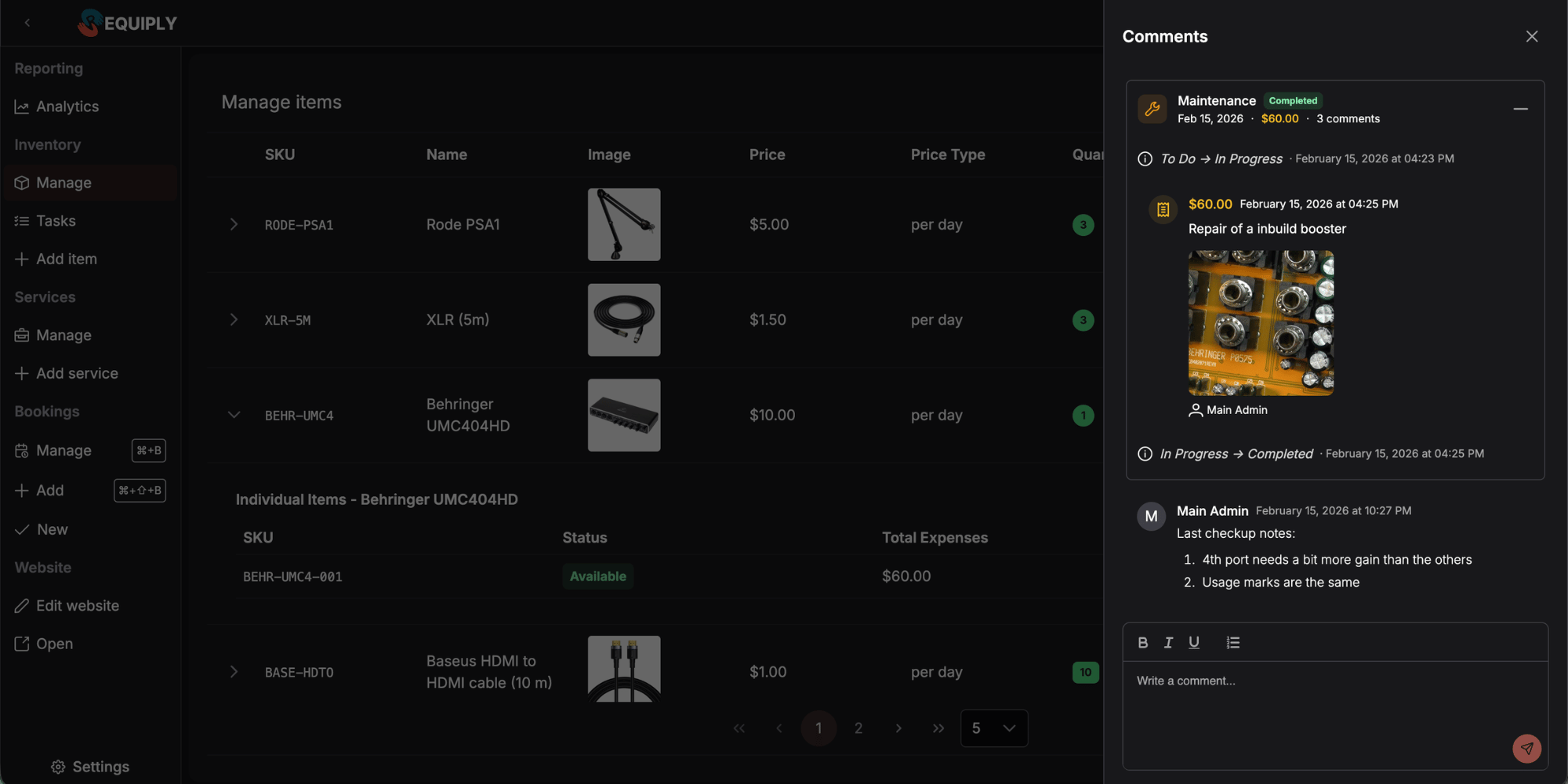
Now you can leave comments on items, tasks, and bookings. Comments open in a drawer from the actions dropdown on any listed entity.
Where Comments Appear
Item Comments — add notes about condition, special handling instructions, or client feedback directly on individual SKUs.
Task Comments — discuss maintenance progress with your team. Attach expense receipts, photos of damage, or supplier invoices as files.
Booking Comments — leave internal notes about client requests, delivery instructions, or last-minute changes visible to your team.
Practical Use Cases:
- Event Rental: Your delivery driver comments on a booking that the venue loading dock is at the rear entrance — the setup crew sees it before arriving at the London conference centre
- Camera & Lens Hire: A technician comments on a Canon EF 70-200mm that the zoom ring feels stiff after return. The next person checking it out in Sydney reads the note and inspects before dispatch
- Party Supply Rental: Attach a photo of a torn inflatable to the maintenance task comment so the repair team in Denver knows exactly what to fix
3. Maintenance Workflow
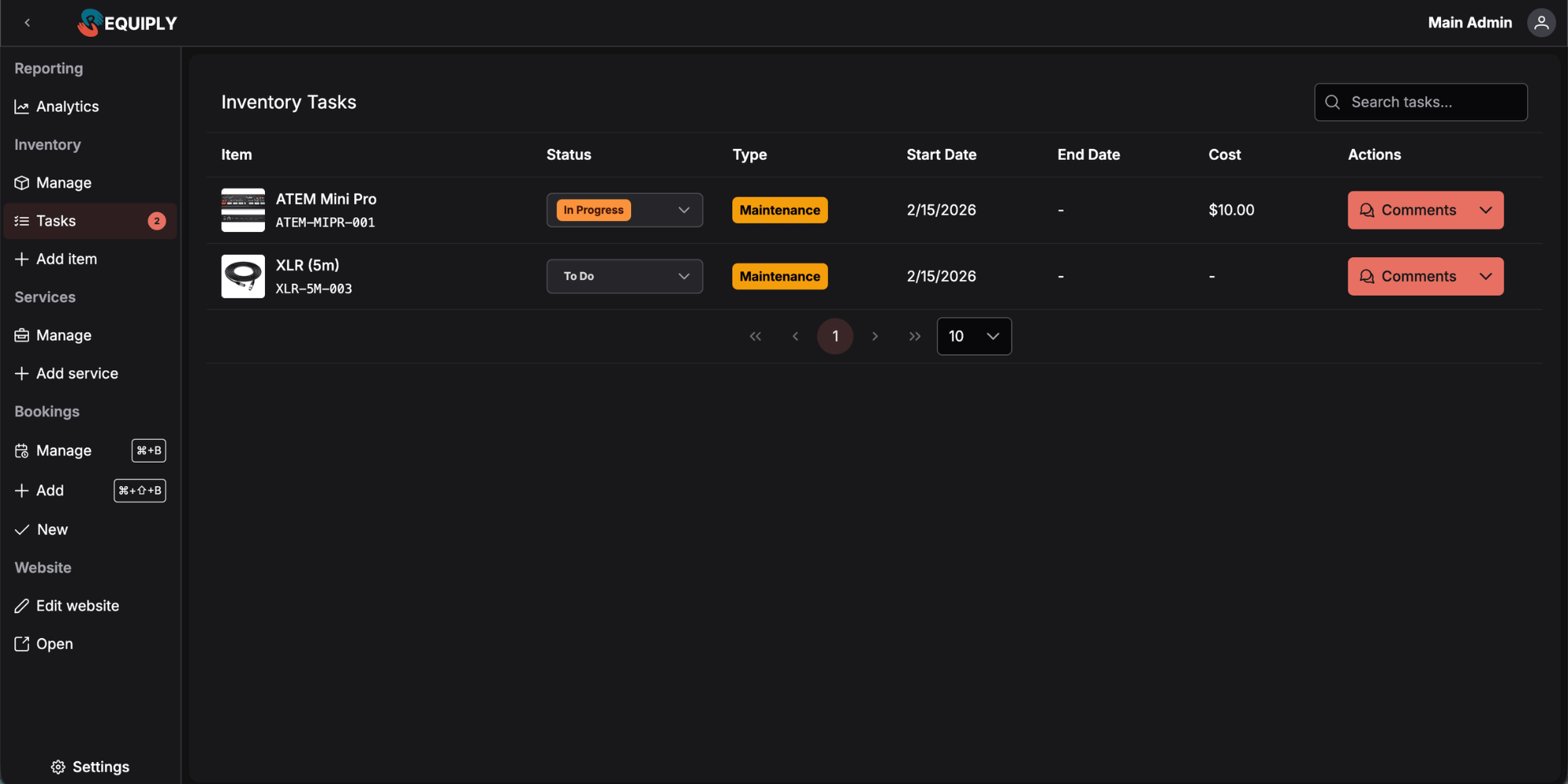
Click on any individual item to move it to On Maintenance status. This automatically creates a task on the Inventory > Tasks page with a Kanban-style workflow.
How Maintenance Works
Step by Step
- Start Maintenance — Click an individual SKU and select "On Maintenance." The item becomes unbookable immediately
- Work the Task Board — Move the task from To Do to In Progress to Done as work progresses
- Track Expenses — Add costs at any stage: parts, labour, external repairs. Attach receipts via task comments
- Complete & Return — When the task moves to Done, all expenses and comments are saved to the item's history
Where Expenses Show Up
After a maintenance task is completed, its expenses and comments are visible in the item's comment history — grouped with an expense summary and expandable comment view. Every expense is also visible on each individual SKU within the item group.
Practical Use Cases:
- Marquee & Tent Hire: A marquee panel tears during a Cotswolds wedding. Mark it On Maintenance, log the $180 fabric repair cost, and it's automatically blocked from bookings until the task is done
- Power Tool Rental: A Makita circular saw needs a blade replacement. The task moves through your board while you log the $45 blade cost — visible on that SKU forever
- Luxury Vehicle Fleet: Your Range Rover goes in for brake service. Add the $800 mechanic invoice to the task, and when you review the vehicle's SKU history, every maintenance cost is right there
4. Expense Analytics
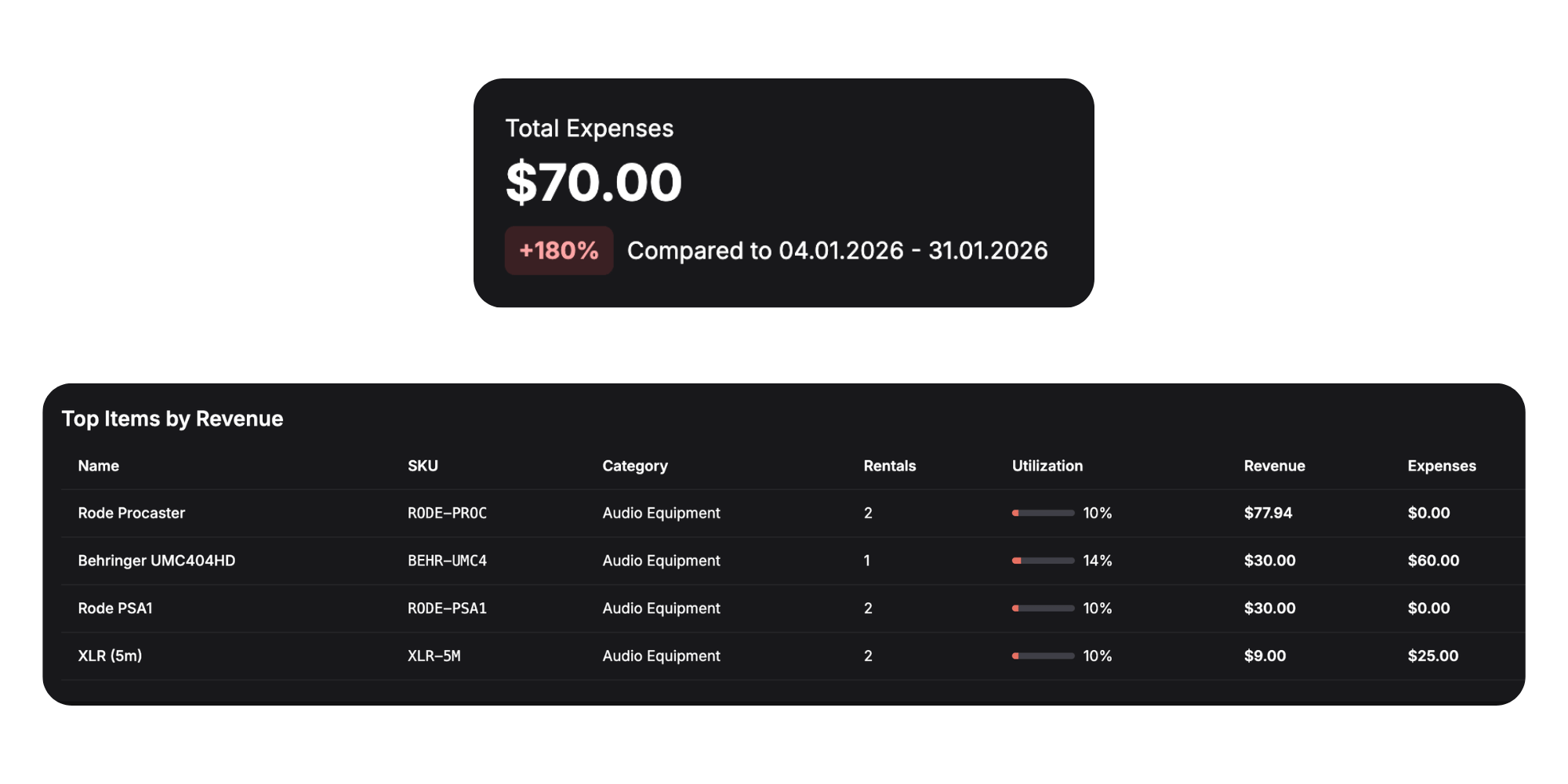
The Reporting > Analytics page now includes a dedicated Expenses card showing all maintenance costs for tasks completed within the selected period.
Now you can compare what each item earns against what it costs to maintain. The item performance table at the bottom of the analytics page includes an expense column, giving you a clear picture of each asset's true profitability.
Practical Use Cases:
- AV Equipment Rental: Discover that your oldest projector cost $600 in maintenance last quarter but only generated $400 in revenue — time to retire it
- Bike Rental Fleet: See that mountain bikes average $25/month in maintenance versus $15 for road bikes, helping you make smarter purchasing decisions for your Portland fleet
- Bouncy Castle Hire: Compare maintenance expenses across your inflatable range to identify which units are costing more than they're worth heading into summer season
What's Next?
With SKU-level tracking, comments, and maintenance expenses now in place, Requiply gives you a much clearer picture of your inventory's health and true cost of ownership. We're continuing to build on this foundation based on real feedback from customers.
Next we will polish comments and inventory workflows, start working on account employee assignments and invites for a better setup experience. Also we are working on our knowledge base, so it's easier to find what features does Requiply have.
Have questions or suggestions? Write to us at info@requiply.com — we're always happy to hear from you!
- Requiply version
- requiply
- inventory management
- SKU tracking
- asset maintenance
- rental comments
- expense tracking
- equipment maintenance
- rental inventory