

AI usage
The AI usage page is where admins track AI credit balances and buy more credits for AI-powered features: the Requiply Assistant, the AI web widget, and the booking assistant on your client portal.
You can find this page under Settings → Organization → AI usage, at https://app.requiply.com/settings/org/ai-usage.
Any member can still see how many credits are left in the mobile app, see Checking credits in the mobile app.
Credit types
Requiply separates included plan credits from purchased top-up credits.
| Credit type | What it means |
|---|---|
| Plan credits | Monthly credits included with the subscription tier. Advanced includes 2,000 base credits per billing period; Core includes 400. |
| Additional credits | Purchased top-up credits. They roll over and do not expire. |
| Total available | The sum of remaining plan credits and remaining additional credits. |
How credits are counted
- 1 credit = 3,000 AI tokens, rounded up, with a minimum of 1 credit per AI request.
- A typical Requiply Assistant message costs about 8 credits. Longer conversations and tool-heavy requests cost more. Answers that read your workspace data, such as bookings, clients, or reports, look up several records before replying, so they usually cost more than a question answered from the Knowledge Base.
- Template drafting costs half. When the assistant drafts or edits an email, message, or document template, the request is charged at half the normal credit price, still at least 1 credit.
- A bundle photo costs a flat 15 credits. Generate from items on a bundle checks that 15 credits are available, and charges them only when the photo is created. A failed attempt costs nothing.
- Credits are used by the Requiply Assistant, bundle photo generation, the AI web widget on your website, and the booking assistant on your client portal.
- Plan credits are used first, then additional credits.
When credits run out
Every AI action needs at least 1 available credit to start. With no credits left:
- the Requiply Assistant replies Your organization has no AI credits remaining. To get more, upgrade to the Advanced tier or buy AI credits., and in the mobile app Your organization has no AI credits left. An admin can buy more on the web in Settings → AI usage.,
- Generate from items on a bundle shows Not enough AI credits. Top up to generate photos.,
- the AI web widget and the portal booking assistant stop answering visitors,
- the API returns AI credit limit reached. Please add credits to continue.
A reply that has already started is never cut off in the middle. Its usage is settled when it finishes.
What you'll see
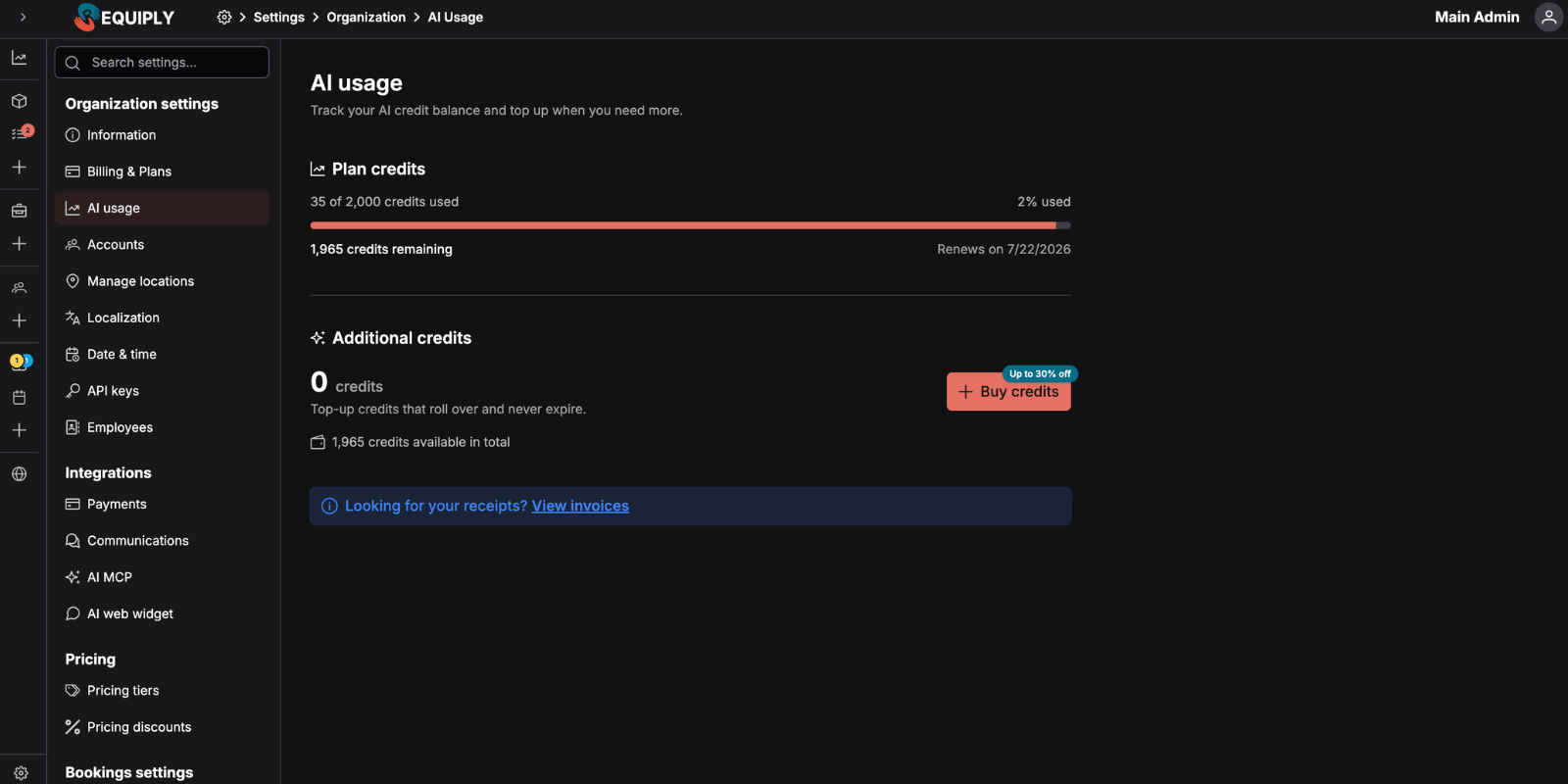
The page has two main sections.
Plan credits
The Plan credits section shows:
- {used} of {total} credits used, and {percent}% used.
- A progress bar of the remaining plan credits. It turns orange when 20% or less is left, and red at 5% or less.
- {count} credits remaining.
- Renews on {date} for the current period, when available.
If your organization has no monthly plan allotment, Requiply shows a short message and points you to additional credits.
Additional credits
The Additional credits section shows:
- The number of purchased credits still available.
- A Buy credits button.
- A discount badge showing the maximum available top-up discount.
- {count} credits available in total across plan and additional balances.
Checking credits in the mobile app
In the Requiply mobile app, open the Assistant tab and tap Open chat history. The drawer shows an AI credits meter to every member, not only admins:
- {percent}% left, with one bar for plan and purchased credits together. The bar turns red when less than 15% is left.
- {left} of {total} credits.
- Renews {date}, when plan credits renew.
When the plan has no monthly credits, the meter reads No AI credits on this plan. Buying credits is only possible on the web, on this page.
Buy additional credits
Click Buy credits to open the purchase dialog.
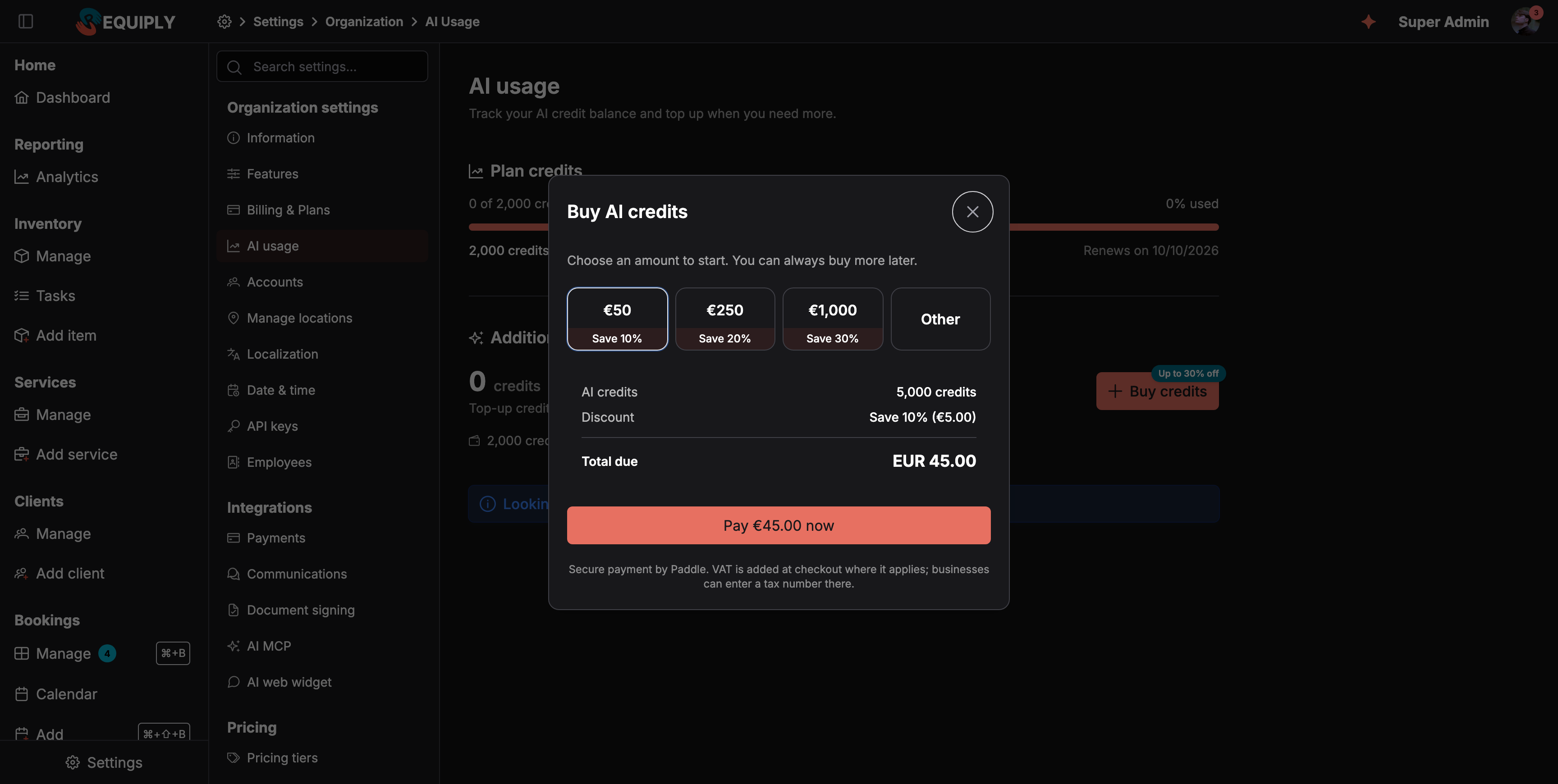
Choose a top-up amount
Select a preset amount or choose Other to enter a custom EUR amount.
Review the quote
The dialog shows how many credits you will receive, the discount, and the net total. VAT is added at checkout where it applies.
Continue to payment
Click Pay €{amount} now. The Paddle checkout opens on top of the AI usage page, so you never leave Requiply. Businesses can enter a tax number in the checkout to have VAT handled correctly.
Watch the balance update
After successful payment, the checkout closes and Requiply refreshes the balance. The page may poll briefly while the payment settles.
Top-up pricing
AI credits are priced from a EUR top-up amount: €1 = 100 credits. The preset tiers are:
| Top-up value | Discount |
|---|---|
| EUR 50 | 10% |
| EUR 250 | 20% |
| EUR 1,000 | 30% |
Custom top-ups are available from EUR 10 to EUR 100,000. Discounts apply automatically once the custom amount reaches the matching threshold.
Receipts and invoices
Looking for your receipts? View invoices opens Billing & plans at Settings → Organization → Billing & Plans. Credit purchases are listed there as {count} AI credits, next to subscription payments. Credit purchases have no PDF in that list.
Common scenarios
Check whether AI features can keep running
- Go to Settings → Organization → AI usage.
- Check Total available and the color of the plan credits bar.
- If the balance is low, click Buy credits and add more.
Buy a discounted top-up
- Click Buy credits.
- Choose EUR 50, EUR 250, or EUR 1,000.
- Review the discount and total due.
- Click Pay €{amount} now and complete the payment in the Paddle checkout.
- Wait for the balance to update after the payment succeeds.
Use a custom amount
- Click Buy credits.
- Select Other.
- Enter an amount between EUR 10 and EUR 100,000.
- Confirm the quote and continue to payment.
Troubleshooting
Purchased credits do not appear immediately The page polls the balance after a successful checkout because the payment can settle a moment after the checkout closes. Wait briefly and refresh if needed.
The checkout did not open Try the purchase again. If an error message appears in the dialog, check that the amount is within the allowed range.
Plan credits show zero Core includes 400 and Advanced includes 2,000 plan credits per billing period. Zero means this period's plan credits are used up: buy additional credits, or wait for the renewal date shown under Plan credits.
The assistant says there are no AI credits remaining Both plan and additional credits are used up. Buy credits here; the assistant works again as soon as the balance is above zero.
Invoices are needed Use View invoices on the AI usage page to open Billing & plans.
Troubleshooting
Fix a connector that will not connect, a sign-in that stops at Admin role required, changes the assistant refuses, booking requests outside working hours, and tools that do not appear.
Overview
Build rental storefronts, server integrations, and AI agents on Requiply with the TypeScript SDK, the public REST API, or the MCP server.