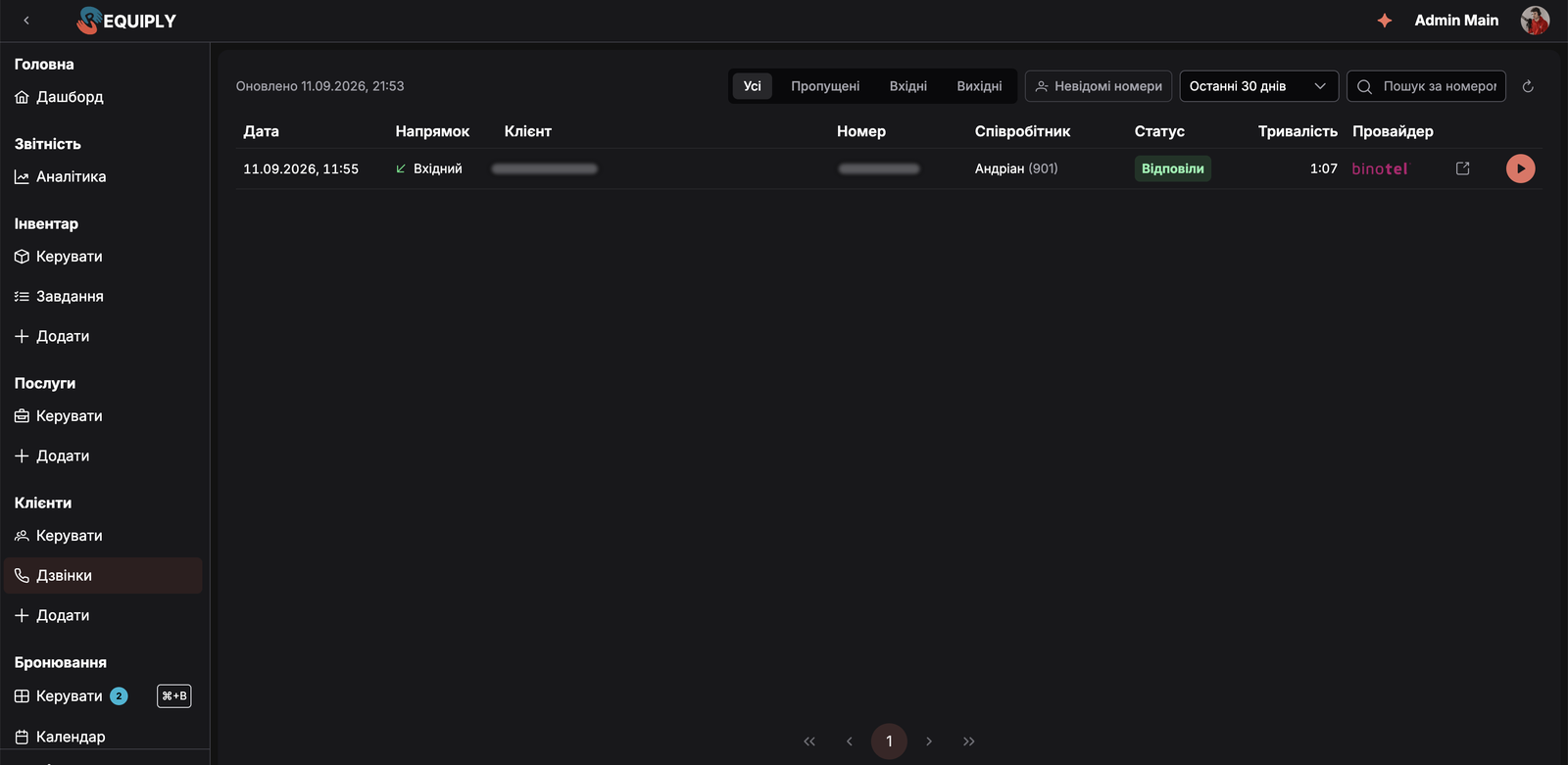
Requiply 1.3.0 collects everything shipped since 1.2.9: notifications from the Requiply team, a calendar you can filter by client and item, pinned booking fields, chargeable period adjustments, after-hours bookings, unit scanning at the counter, Binotel calls next to your clients, AI assistants that can change your setup, and subscriptions billed through Paddle.
Version 1.2.9 was about the day away from the desk. 1.3.0 comes back to it.
Most of what changed happens at the booking desk. The phone rings. A client wants gear for the weekend, would like to pick it up on Friday and pay for Saturday and Sunday only. That answer used to be spread across the calendar, the phone system and a total edited by hand. This release puts it in one place, and gives us a way to tell you what changed without sending an email.
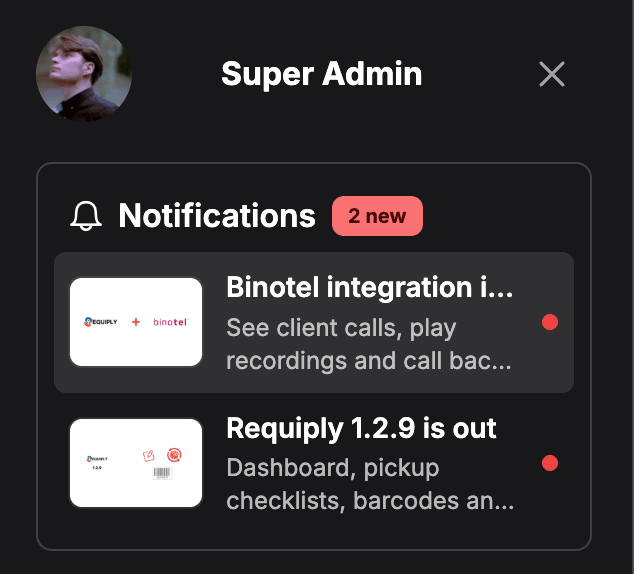
Requiply now has notifications of its own. They carry news from our team about new features, outages, events, releases and tips, and arrive in the account drawer behind your name. Booking alerts still go out through workflows.
A red badge on your avatar counts unread notifications, and new ones arrive without a reload
The Notifications card sits at the top of the account drawer, newest first, with Show more for older ones
Four categories: announcements, release notes, tips and system notices
Longer notifications open as a page of their own, with images, lists and a Learn more button
Read status syncs across devices, and notifications appear in your interface language when a translation exists
New accounts start clean, with everything published before you joined already marked as read
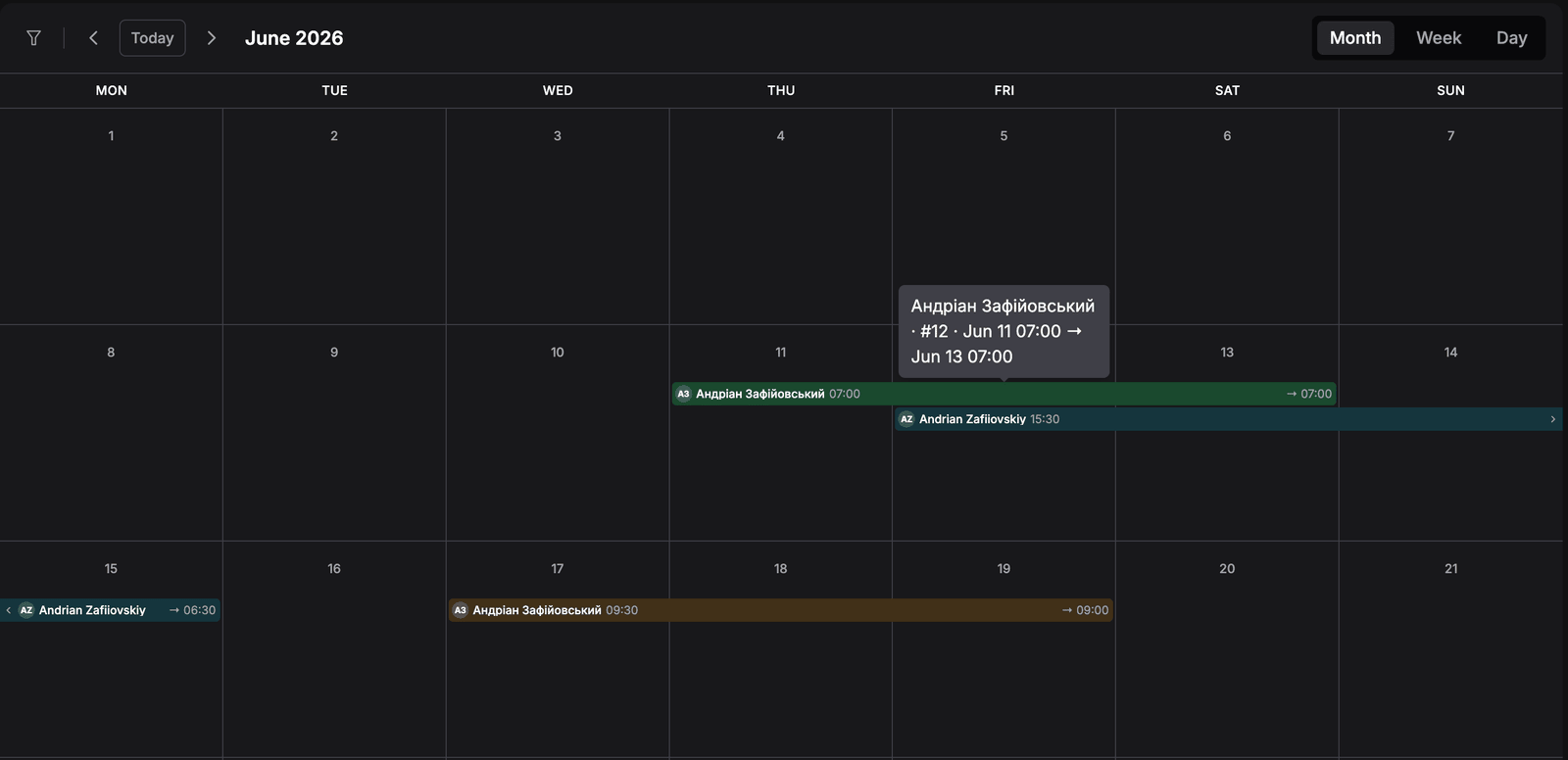
The calendar used to show booking numbers and times. Now it shows people. Every booking carries the client's initials and name on its status color, and each view was rebuilt around what it does best.
Month view draws each booking as a bar across its days, with the pickup time at the start and the return time at the end
Week view keeps multi-day rentals in a strip at the top and places same-day bookings on a 24-hour grid
Overlapping bookings sit side by side, and a +N block lists the ones that do not fit
Day view adds the booking number, total and item count, and a red line marks the current time
Hover a booking in month or week view to see the client, number and dates in one line
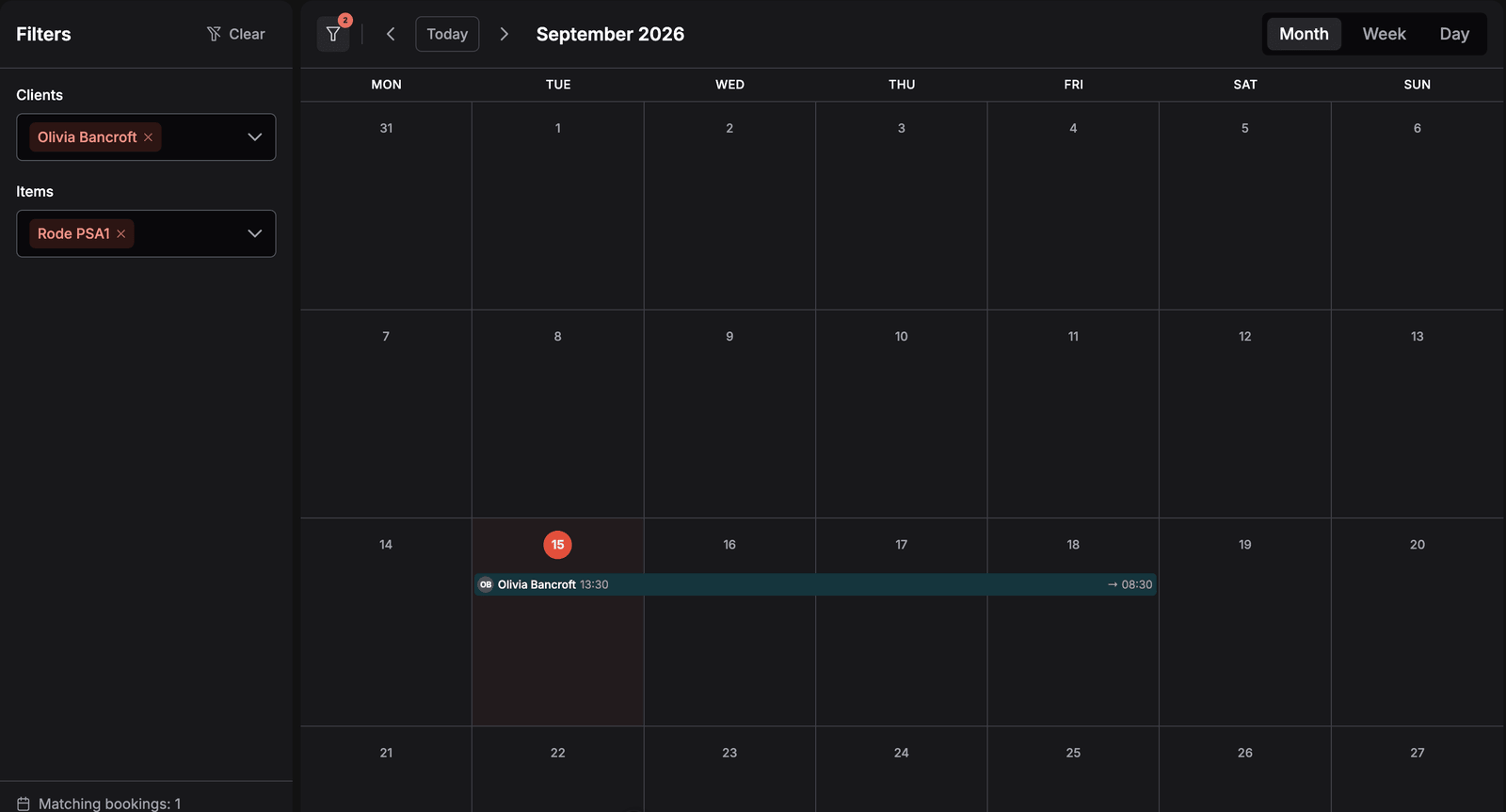
The new Filters panel narrows the calendar to the bookings you are asking about, such as one client's rentals this month or every booking with a particular camera.
Pick one or more clients, one or more products, or both
Products match whether they were booked by quantity or as a specific unit
The panel counts matching bookings, and a badge on the filter button shows how many values are selected
Filters stay in the page address, so they survive opening a booking and going back, and a filtered calendar can be shared as a link
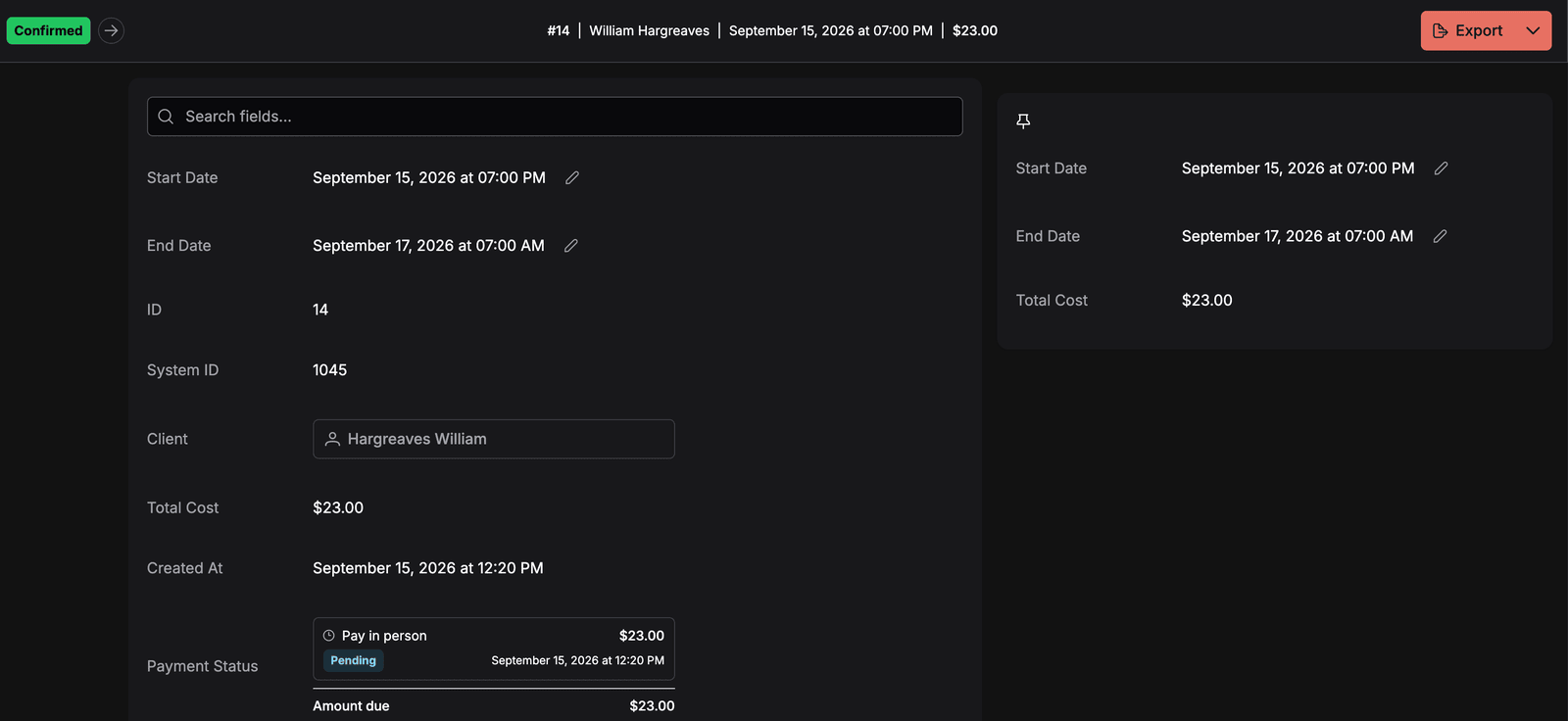
In 1.2.9 you chose which fields a booking page shows. In 1.3.0 you can keep the important ones in view. A pinned field gets its own card beside the booking details, and the card stays put while you scroll to payments and documents.
Pin any visible booking field under Settings → Fields → Detail page fields
The pinned card sits to the right of the details on a wide screen and moves to the top on a smaller one
Pinned fields keep their actions, so you can change the dates straight from the card
Items, services and the payment ledger rearrange themselves to fit the narrower card
Prices follow the dates, and pickups follow working hours. Deals are made with people, who collect on Friday, turn up after closing and ask for the exact tripod they rented last time. Three changes let staff handle those exceptions inside Requiply instead of around it.
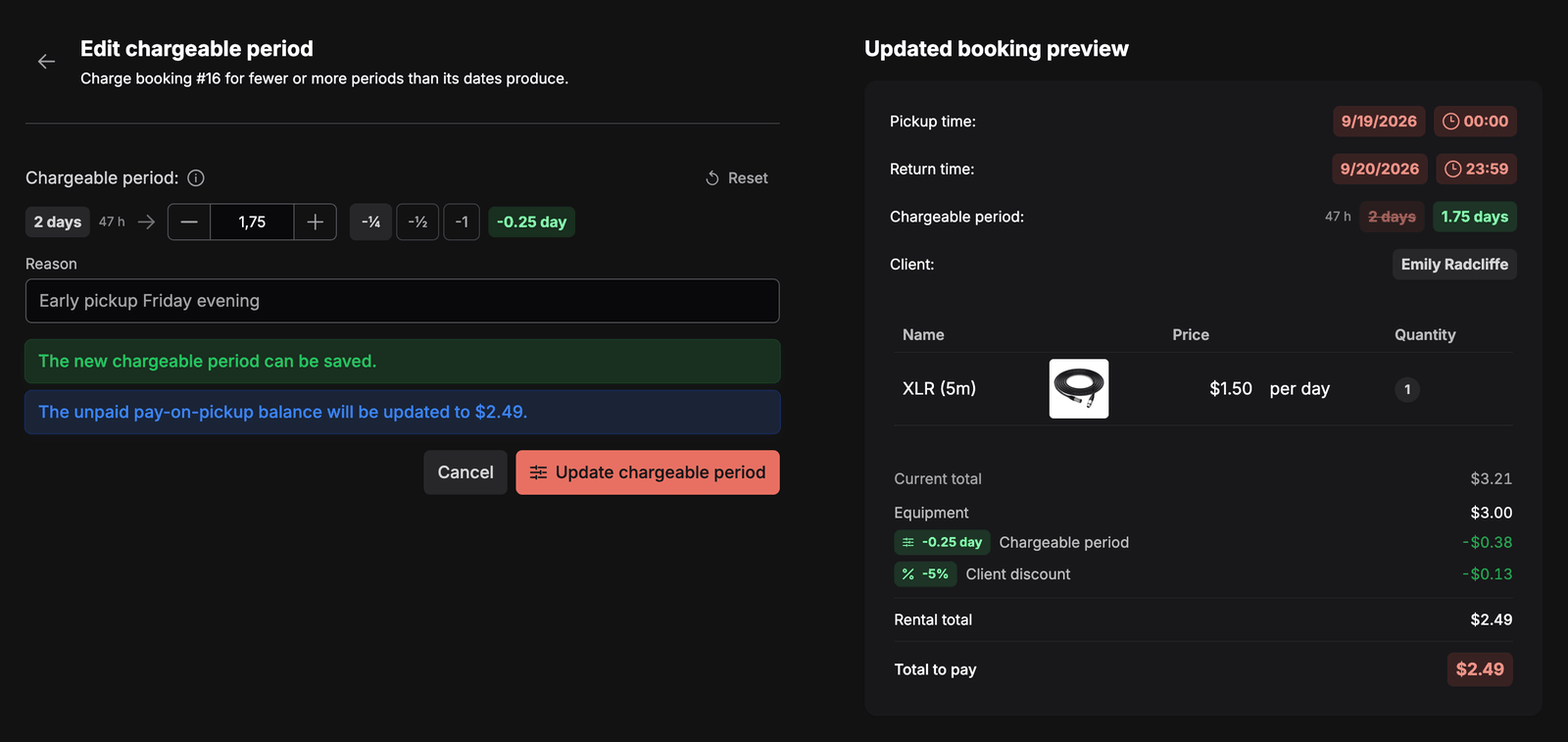
A client picks up on Friday so the gear is ready for Saturday morning. The dates count three days, but you agreed to charge for the weekend only. The -1 preset sets the chargeable period to 2 days, and the total follows. Until now that meant editing the total by hand and losing the discount the next time someone moved the dates.
Charge for fewer or more days or months than the dates produce, with -¼, -½ and -1 presets
The reason you add is printed on the invoice
Deposits, documents and later changes to dates or items keep the adjustment
Change it later from the Chargeable period row on the booking, or set it while creating a booking in the mobile app
Turn it on under Features, then allow it for the permission groups that need it
Using a different phone system? Write to us at info@requiply.com and we will look into it. Client feedback and suggestions shape what we build, and the Binotel integration came about exactly that way.
The MCP connection for Claude and ChatGPT used to answer questions and draft booking requests. Version 2 can also change your setup, and it always shows you the change first.
Write and fix email, message and document templates with the macros your organization actually has, previewed on a real booking
Create, edit, enable and disable workflows, such as a reminder 24 hours before pickup
Change working hours, booking rules, deposits and features
Create and update clients, categories, services and locations
Every change comes back as a preview with the exact values before and after, and nothing is saved until you approve it
The server address is now https://api.requiply.com/api/mcp, and connections using the old address keep working
Requiply subscriptions are moving from Ukrainian acquiring and custom invoices to Paddle. The switch improves billing and supports our international expansion. Your clients' payments are not affected.
Prices do not change for businesses and existing customers
Add the tax number of your sole proprietorship, LLC or other business, and Paddle removes VAT in countries where that applies, such as Ukraine
Paddle sends payment notifications and a proper invoice for every payment
The Requiply team writes them, covering product updates, outages, events, tips and system notices. Organization administrators cannot create them. To alert your team about bookings, build a workflow with the push notification action.
No. The booking page and the AI web widget only offer times within your schedule. The new permission affects the staff date picker only, and every time outside the schedule still has to be confirmed there.
Pinning is available for booking fields only. Choose them under Settings, Fields, Detail page fields, on the Booking tab.
No. Every change arrives as a preview with the exact values to be saved, and the assistant saves it only after you approve. Only an administrator can connect an assistant.
Earlier payments stay in your invoice list, but nothing renews through Monobank any more. Subscribe from Billing and Plans when you are ready, and the first Paddle payment replaces the old subscription.
1.3.0 brought the phone, the calendar and the exceptions to the rules into Requiply. It also gave us a direct line to you, so the next release note, outage notice or tip will reach your Notifications card first.
Have questions or suggestions? Write to us at info@requiply.com. We would like to hear how the calendar filters hold up in a busy week and which fields you ended up pinning.
Tags
Requiply version
requiply
notifications
calendar
calendar filters
pinned fields
chargeable period
working hours
unit scanning
binotel
call recordings
MCP
paddle
billing
rental software
Try Requiply for free
Automate your rental business and save 10+ hours per week