


Moving from Booqable to Requiply takes three steps: create an API key in Booqable, paste it into Requiply and pick what to bring. Requiply copies your settings, customers, products and booking history with payments. Booqable keeps running meanwhile, so you can test on real data before you cancel anything.
We build Requiply, so read the comparison with that in mind. Booqable facts were checked on 13 October 2026.
How does Requiply compare to Booqable?
| Requiply | Booqable | |
|---|---|---|
| Mobile app | Included in every plan | +$9 per user |
| Barcode and QR scanning | Included in Advanced and Scale | +$9 per user, from Grow |
| Extra user | €6 | Not sold separately, you move to a higher plan |
| Team of 5 with app and scanning | €66 | $159 |
| AI that answers your customers | Yes (Advanced) | No |
| AI assistant for staff | Yes | Yes (Bo, since July 2026) |
| Customer chats in one inbox | Telegram, Instagram, website chat | No |
| Automated client notifications | Email, SMS, Telegram | Email (SMS through Zapier) |
| Online payments | Stripe, plus your provider on request | Stripe, PayPal and others |
| Custom development | On request | Custom plan, from $349 |
Prices are per month, billed yearly. Monthly prices and the full math: Booqable vs Requiply.
Booqable is ahead on a template website builder, a Shopify plugin and the number of ready-made integrations. If you rely on those, check them before you move.
Why do rental businesses switch from Booqable?
Can AI answer my customers?
Yes, on Advanced. The assistant replies on your booking page, in your website chat and in connected messengers. It checks live availability, quotes from your price list and sends a booking request for your team to confirm. Anything it cannot handle goes to a person. Booqable's Bo works only for staff inside the back office.
Can I answer Instagram, Telegram and website chats in one place?
Yes. Telegram, Instagram and your website and booking page chats arrive in one inbox on web and mobile, next to the client and their bookings. AI replies first, and anyone on the team can take over. The inbox is in beta on every plan: turn it on in Settings > Features.
We checked 12 rental platforms, including Rentman, Current RMS, Goodshuffle Pro and Point of Rental. None brings Instagram or Telegram chats into the product. Booqable's messaging integrations are still "gathering feedback" on its public roadmap.
Can I choose when and how clients get notified?
Yes. Requiply is built so you decide how your rental runs. Workflows are a built-in Zapier for bookings:
- When: a new booking, a status change, a payment, or a set time before or after pickup or return.
- Only if: the booking, the client or your own custom fields match your rules.
- Then: email the client, send an SMS or Telegram message, notify your team or change the booking status.
Each message uses your own template, and emails and Telegram messages can attach your invoice, rental agreement or handover act. The pickup reminder arrives in your words, with the contract attached.
Is the mobile app native?
Yes. On iPhone, menus, date pickers, search and charts are Apple's SwiftUI controls, with Liquid Glass on iOS 26. Android uses Jetpack Compose, Google's native toolkit. Long lists stay smooth, tablets show the list and details side by side, and a booking saved on a weak connection is never created twice. Booqable's app is a paid add-on rated 2.6 out of 5 from 19 ratings on the US App Store.
Can people with poor eyesight use Requiply?
Yes. Text follows the phone's font size, and the app's Large and Extra Large settings go up to twice the normal size. Screens rearrange instead of cutting words off, and most controls have VoiceOver and TalkBack labels. If something is hard to read or use, tell us and we will fix it.
What if Requiply is missing something I need?
Ask for it. Rental owners, managers and staff know best what the software should do, so most of our features start as customer requests. We ship a release every two to three weeks (release history). The Booqable importer and the WordPress plugin in this post exist because rental businesses leaving Booqable asked for them.
The same goes for payments. Stripe is built in, and our payment system is not tied to one provider, so we can add the one you use on request.
Larger businesses can get custom development and priority on their requests. Talk to us about terms.
What moves from Booqable to Requiply?
| From Booqable | What Requiply copies |
|---|---|
| Settings | Working hours and timezone, buffer between bookings, default deposit, company email, phone and logo |
| Customers | Name, email, phone, address, discount |
| Products | Variations, stock, units with serial numbers, categories, deposits, photos |
| Prices | Base prices, and tiered prices and all price structures as matching Requiply price tiers |
| Bookings | Items, dates, status, totals, deposit, payments, notes, assigned units |
| Sales items | With stock, when the Sales feature is on (Advanced) |
You choose the full booking history or only open bookings, and which Requiply status each Booqable status becomes. Archived products that old bookings use come along automatically.
What does not move: your Booqable store and website templates, taxes, seasonal price rules, closure dates, email and document templates, and team members. Amounts in another currency are copied without conversion. Prices with no exact match (flat per booking, weekly, per minute) become daily or hourly prices and are listed under "Things to check" at the end.
How do I migrate from Booqable to Requiply?
- Create a Requiply account. 14-day trial, no card.
- Create a Booqable API key as the account owner or an admin (Booqable's guide). Booqable lists API access from the Grow plan. On Start, email
info@requiply.comand we will plan the move with you. - Connect. Open Settings > Integrations > Data migration, choose Booqable, enter your company name (
yourcompanyfromyourcompany.booqable.com) and the key, then click Connect.
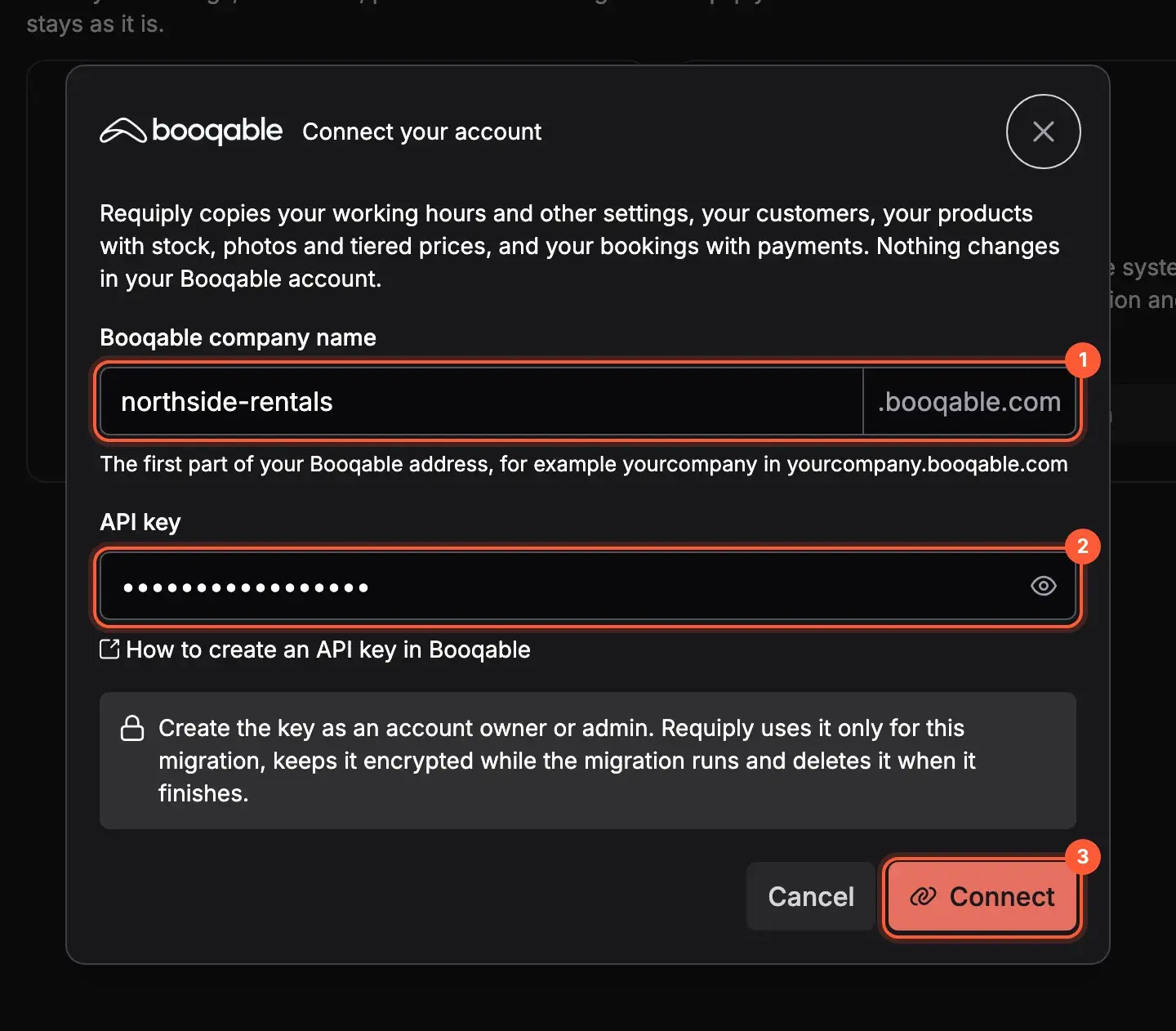
Company name (1), API key (2), Connect (3).
- Choose what to bring: settings such as working hours and price tiers, customers, products with or without photos, all or only open bookings, and the status mapping. Each setting shows the value it will set before you start.
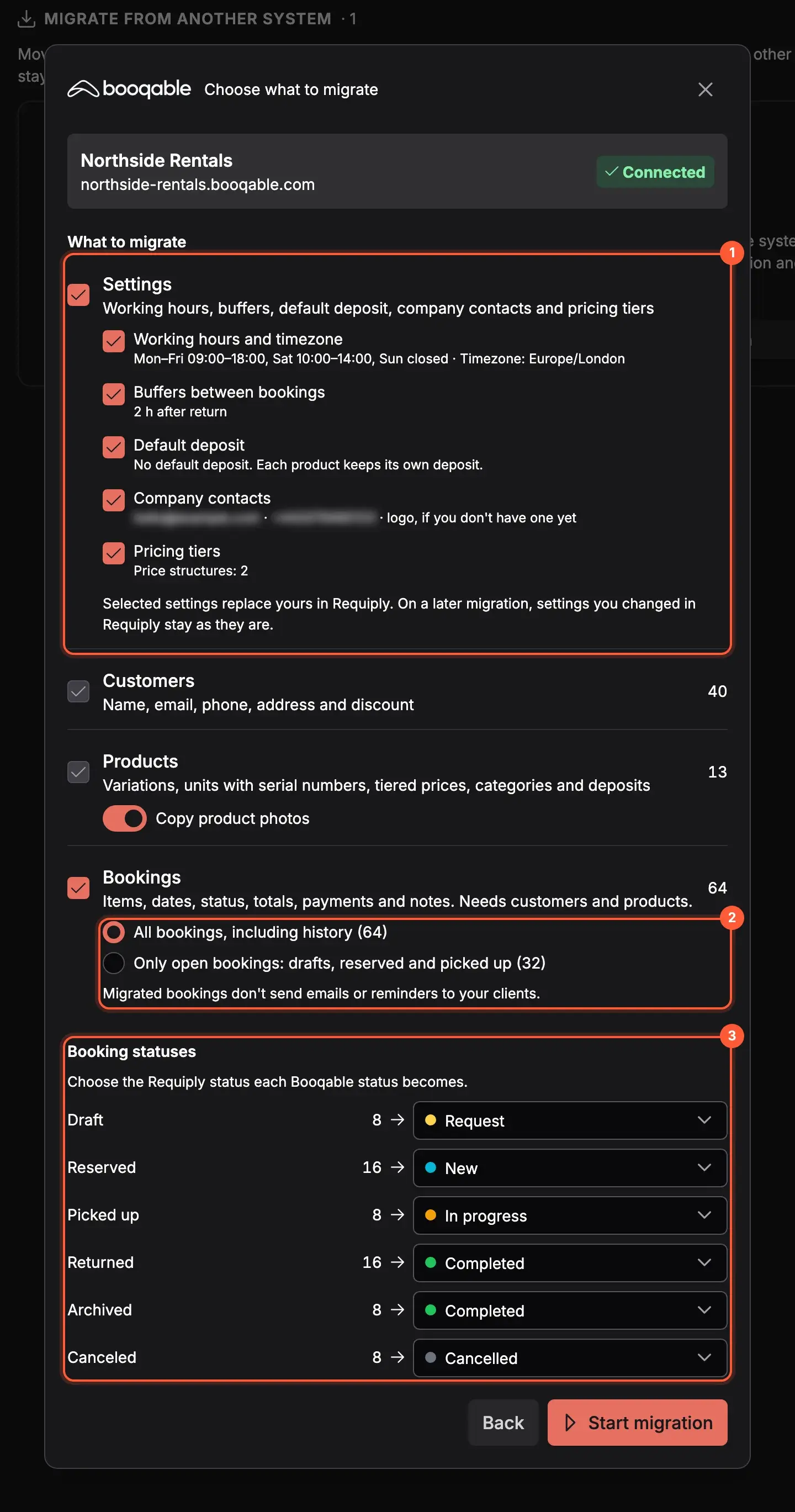
Settings (1), which bookings (2), status mapping (3).
- Start. The migration runs on our servers, so you can close the page. At the end you get a summary and a short list of things to check.
Can I keep using Booqable while I test Requiply?
Yes. Import on day one and keep taking bookings in Booqable. Before you switch, run the migration again. It adds what is new and updates bookings and settings changed in Booqable, without duplicates and without touching anything you changed in Requiply. Then cancel Booqable.
What happens to my website?
On WordPress, install the free Requiply Rental Booking plugin and click Migrate from Booqable. It rewrites shortcodes like [booqable_button id="…"] into Requiply ones, so product buttons keep working. WooCommerce stores can also sync products from Requiply. Guides: WordPress, WooCommerce.
On any other site, link to your Requiply booking page or add booking buttons with one script.
Try it on your own data
- Create a free account
- Book a demo
- Email
info@requiply.com
Coming from Rentman, Current RMS or a spreadsheet? Use the "Your system isn't listed?" form on the Data migration page and we will plan the move with you.
Frequently Asked Questions
- Booqable alternative
- migrate from Booqable
- switch from Booqable
- Booqable export
- Booqable vs Requiply
- equipment rental software
- rental software
- rental business
- data migration
- AI chatbot for rental business
- omnichannel inbox
- rental app
- Requiply