

AI assistant and handoff
On the Advanced plan, the AI assistant can answer clients in the Conversations inbox before anyone on your team does. It answers with your real catalog, prices and availability, can create bookings, and hands the conversation to your team when the client asks for a person or the question needs one.
On the Core plan, every conversation goes straight to your team. The settings page shows Let the AI assistant answer first with an Upgrade to Advanced button instead of the assistant settings.
On Advanced, the assistant is activated once with Generate public API token on the AI assistant tab, see Activate the AI assistant.
When the assistant answers
Pick the mode under Settings → Integrations → Omnichannel inbox → AI assistant, see Omnichannel inbox settings.
| Mode | What happens |
|---|---|
| Always | Clients who start a new conversation, or write again after it was closed, talk to the assistant first and can ask for a person at any time. |
| Never | The assistant never answers. Every conversation goes straight to your team. |
| During working hours | The assistant answers during the working hours set under Date & time. Outside them conversations go straight to your team. |
| Outside working hours | Your team answers during working hours. Evenings, weekends and days off are covered by the assistant. |
Each connected channel can follow this mode (Same as organization) or use its own, in the AI working hours column of the Channels table. For example, OLX buyers can get instant answers around the clock while Telegram clients reach your team during the day.
The website chat and the client portal chat have their own switch, AI assistant answers first, in the booking page settings and on the AI web widget page. When it is off, visitors chat with your team directly and the portal shows Chat with the team.
What the assistant does
- Answers questions about items, prices, deposits, availability and pickup using your organization's data.
- Can create bookings for the client when they agree.
- Never asks a client who is already linked to a client record for a phone number or email.
- When a client's request for a person is ambiguous, it asks one clarifying question, for example whether they want to talk to a manager in the chat or need an operator added to their booking.
Its replies appear in the thread under AI assistant. In messengers it writes short messages, and in channels that show plain text, such as Instagram, formatting is removed.
Reply language
- The assistant answers in the language of the client's latest message: a message in Polish gets a Polish answer, one in English an English answer.
- A message in Russian is answered in Ukrainian.
- When the client's messages show no language (only a name, a number, a link or an emoji), it answers in your organization's language.
Outside working hours requests
Clients often ask to pick up gear on a Sunday or return it at 22:00. Pickup or return outside working hours, in the How the assistant works section of the AI assistant tab, decides what the assistant does then. Hover the question mark to read What the AI does when a client asks to pick up or return gear on a closed day or outside your hours.
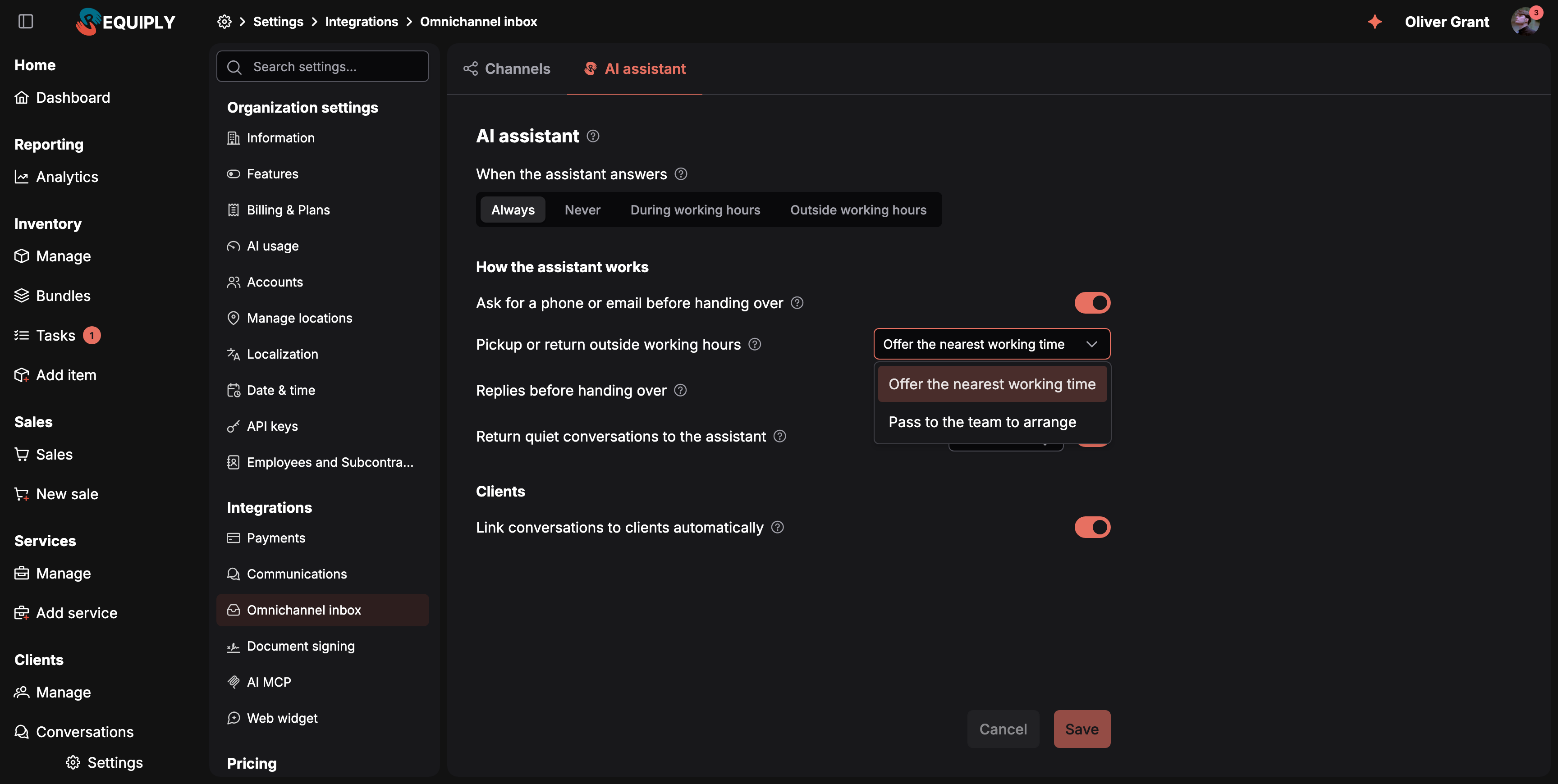
The two ways the assistant can handle a pickup or return outside your hours.
| Option | What the assistant does |
|---|---|
| Offer the nearest working time (default) | Says which pickup or return falls outside your hours and why, then offers the nearest options: the same time on the closest working day before or after, or the opening or closing time that day. It changes the time only after the client agrees. For gear needed over closed days, it suggests picking up on the last working day before and returning on the first working day after. |
| Pass to the team to arrange | Keeps the time the client asked for and says it is outside your regular hours and that the team will confirm. It still picks the kit and checks availability and price, then hands the conversation to your team with the items and the exact requested times in the Handoff summary. It never sends a booking request with times the client did not ask for. |
Choose Pass to the team to arrange if you sometimes hand out or take back gear outside your hours by arrangement. The setting also applies to the website chat and the booking page chat. Where the assistant cannot hand a chat over, for example while the Conversations inbox is off, it offers the nearest working time instead.
Your working hours come from Date & time. The setting is hidden while When the assistant answers is Never.
When it hands the conversation over
The assistant passes the conversation to your team when:
| Reason shown in the Handoff section | When it happens |
|---|---|
| The client asked for a team member | The client asks for a person, or the question needs your team: a custom price, delivery, a complaint. |
| The AI assistant reached its reply limit | It sent as many replies as Replies before handing over allows (20 by default). |
| The AI assistant could not answer | It hit an error or could not use your data. |
| The AI assistant is switched off | The mode does not let it answer at this time. |
Before handing over, the assistant asks once for a phone number or email when Ask for a phone or email before handing over is on (the default), so your team can reach the client and find their record.
After a handoff:
- The conversation shows up for your team with the Handoff section: the reason and a one-paragraph summary of what the client wants.
- The client is told a team member will reply in the same chat.
- Team members who chose Handed off to the team under notifications get a push notification.
Taking over and handing back
- Take over. While the assistant answers, a note above the composer reads The AI assistant is answering. Your reply takes the conversation over. Press Take over or simply reply. In the mobile app, Take over is in the ⋯ menu.
- The client is told a person joined. When you take over by replying, the client first gets a short message in your organization's language, {first name} from our team has joined the chat., and the thread shows {name} joined the conversation. Pressing Take over before replying takes the conversation over quietly, without this message. See Who handles a conversation.
- Return to AI. Hands a conversation your team holds back to the assistant. The button sits in the conversation header on the web and in the ⋯ menu in the mobile app.
- Quiet conversations return by themselves. With Return quiet conversations to the assistant on (12 hours by default), a conversation your team handled that stays quiet that long goes back to the assistant at the client's next message.
- Closing a conversation also returns it to the assistant.
Common scenarios
- After-hours questions. Mode Outside working hours: the assistant answers at night and on weekends, collects a phone number for anything it cannot settle, and the morning shift finds the handoffs waiting.
- A busy OLX listing. The OLX channel set to Always while the organization uses During working hours: buyers asking "is it still available?" get an answer in seconds at any time.
- A Sunday pickup request. A client asks the assistant on Saturday to pick up a camera on Sunday at 10:00, when you are closed. With Offer the nearest working time, the assistant explains you are closed on Sunday and suggests 10:00 on Saturday or Monday, then uses the day the client picks. With Pass to the team to arrange, it checks the camera is free, quotes the price, and hands the chat to your team with Sunday 10:00 pickup in the summary, so a manager can decide whether someone can meet the client.
- A long negotiation. The assistant reaches Replies before handing over and passes the conversation on, so a person picks up a client who is not getting what they need.
Tips and cautions
- Set your working hours first. Without a schedule, During working hours never lets the assistant answer.
- Lower the reply limit if clients go in circles. A limit of 5 to 10 replies hands stuck conversations to your team sooner.
- Keep the contact question on for OLX. OLX does not share buyers' phone numbers, so the assistant's question is often the only way to get one.
Conversations inbox
One inbox for every client chat: Telegram, OLX, Instagram Direct, the website chat widget and the client portal chat. Read and answer messages, edit or delete (unsend) your replies within each channel's limits, see workflow messages and shared posts and stories, take conversations over from the AI assistant, assign them, link them to clients and close them, on the web and in the mobile app.
Omnichannel inbox
Settings of the Conversations inbox: connect Telegram, OLX and Instagram as channels, pause or disconnect them, activate the AI assistant, choose when it answers in each channel, and set handoff rules, pickups and returns outside working hours, the reply limit and automatic client linking.