

Organization info
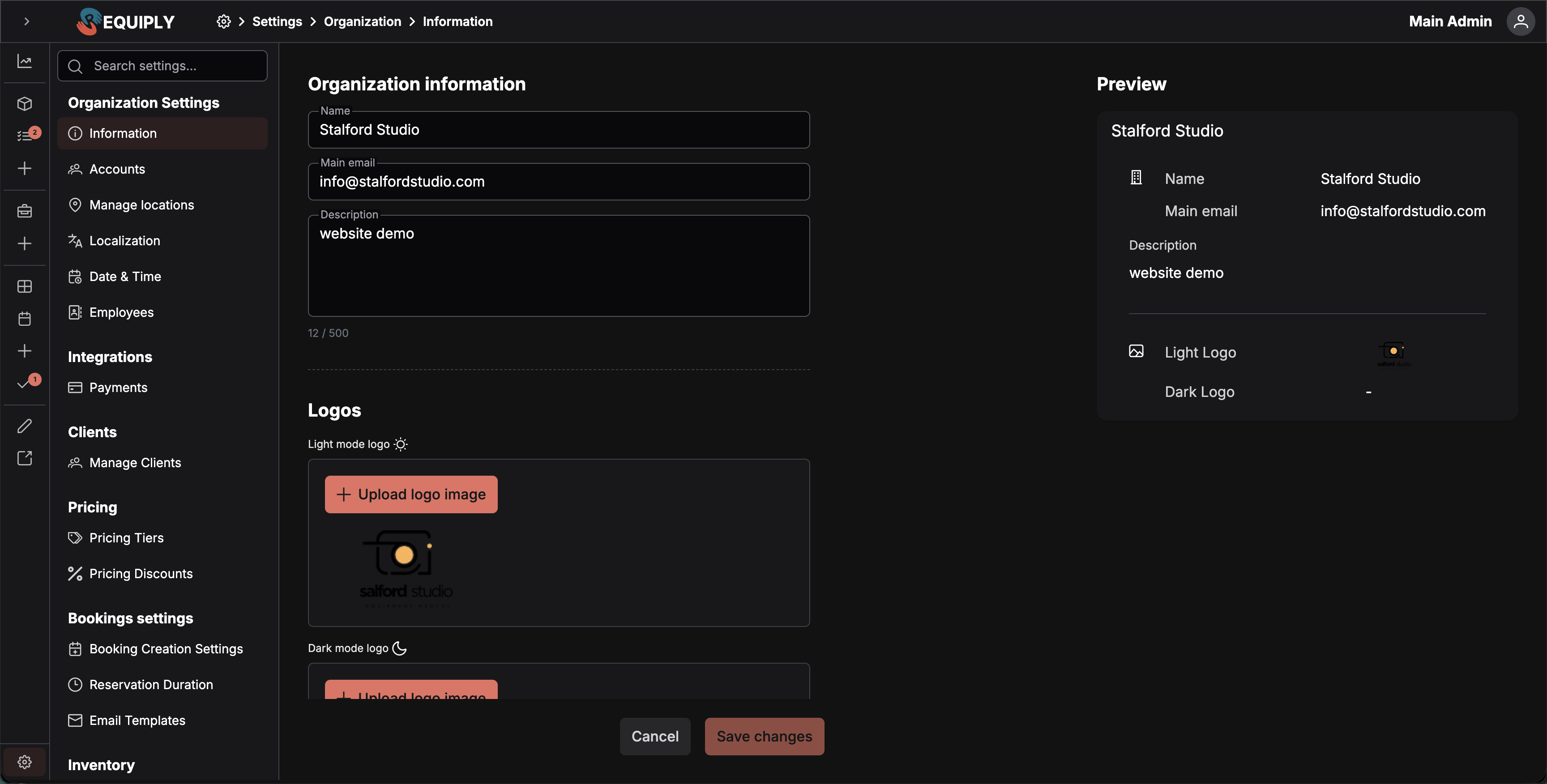
The Organization info page is where you set your company's core identity in Requiply. The data you enter here is used as the default source of truth across the platform — invoices, the client portal, email templates, and customer-facing pages all pull from these settings unless overridden.
You can find this page under Settings → Organization → Information.
Why this page matters
Think of Organization info as your business card inside Requiply. Whenever Requiply needs to display your company name, contact email, description, or logo to a customer, it looks here first.
Filling this out completely means:
- Your invoices show the right company name and email at the top.
- Your client portal greets customers with your branding.
- Your email templates (confirmations, reminders, notifications) automatically include your organization's identity.
- Your customer-facing pages display the correct logo in both light and dark modes.
If you skip this step, Requiply falls back to placeholders or empty fields — which looks unprofessional to your customers.
Fields
Name
The official name of your business. Appears on invoices, in email signatures, in the client portal header, and anywhere a customer sees your brand.
- Required
- Max 50 characters
Main email
The primary contact email for your organization. This is the "from" / "reply-to" address customers see in automated emails, and the contact point shown on invoices and booking confirmations.
- Required
- Must be a valid email address
Phone
The organization's contact phone number, entered with a country code selector (Ukraine is preselected for new organizations) and stored in international format. Available to email and export templates as {{organizationPhone}}, so it can appear in booking confirmations, rental agreements, and handover acts without being retyped into each template.
- Optional
- When filled in, must be a valid number including the country code
Description
A short description of what your business does. Used on the client portal entry page and in some email templates to give customers context about your company.
- Optional
- Max 500 characters
Logos
Requiply supports two logos so your branding looks great in both light and dark interfaces.
Light mode logo
Displayed when the customer's interface is in light mode. Should be a logo that looks good on a white or light background (typically darker colors).
Dark mode logo
Displayed when the customer's interface is in dark mode. Should be a logo that looks good on a dark background (typically lighter or inverted colors).
Supported formats
- SVG — recommended for crisp scaling at any size. Uploaded directly without cropping.
- PNG / JPG — automatically opens a crop tool so you can adjust the framing before saving. You can cancel to keep the previous logo.
Additional fields
Below the logos, the page shows an Additional fields section containing every custom field configured on the Organization level. These are your own fields — a VAT or registration number, a license code, a legal address — defined under Entity fields and attached to the Organization level under Level configurations.
The section is hidden entirely when no organization-level fields are configured.
Values entered here are saved with the rest of the page and become available to email and export templates as {{organizationField_<field key>}}, which makes them the natural place to store the company details that belong on contracts and invoices but that Requiply does not model itself.
Live preview
The right side of the page shows a live preview card that updates in real time as you type. Use it to check that your logo, name, and description look balanced before saving.
Saving changes
- Save changes activates only when you've made changes.
- Cancel reverts everything back to the last saved state, including any logo uploads in progress.
- Changes are validated before saving — if any required field is missing or invalid, you'll see an inline error message.
Setup Guide integration
This page is part of Requiply's Setup Guide. The "Fill org info" step is automatically marked complete once you've filled in:
- Name
- Main email
- Light mode logo
- Dark mode logo
If you arrived at this page from the Setup Guide, you'll be returned there automatically after a successful save.
Where this data is used
| Feature | What it pulls |
|---|---|
| Invoices | Name, email, logo |
| Client portal | Name, description, logos (light/dark) |
| Email templates | Name, email, phone, logo, organization-level custom fields |
| Export templates | Name, email, phone, organization-level custom fields |
| Customer-facing pages | Logos (light/dark based on theme) |
| Internal notifications | Name, email |
Overview
Your workspace identity and company-wide options: company details, optional features, team accounts, subscription, locations, language, schedule, staff, and AI credits.
Features
Turn optional Requiply functionality on or off for the whole organization: subrentals, QR codes and barcodes, pickup and return checklists, booking cost adjustments, sales of goods, the Conversations inbox (Beta), and bundles (kits, sets) with their recommendations.