

Dashboard settings
The Dashboard settings page sets the organization default for the Dashboard lists: which booking statuses Pickups and Returns show. Each team member can still change the lists for themselves with the status filter on the Dashboard; this page decides what everyone starts with.
You can find it under Settings → Bookings → Dashboard, at https://app.requiply.com/settings/reservations/dashboard.
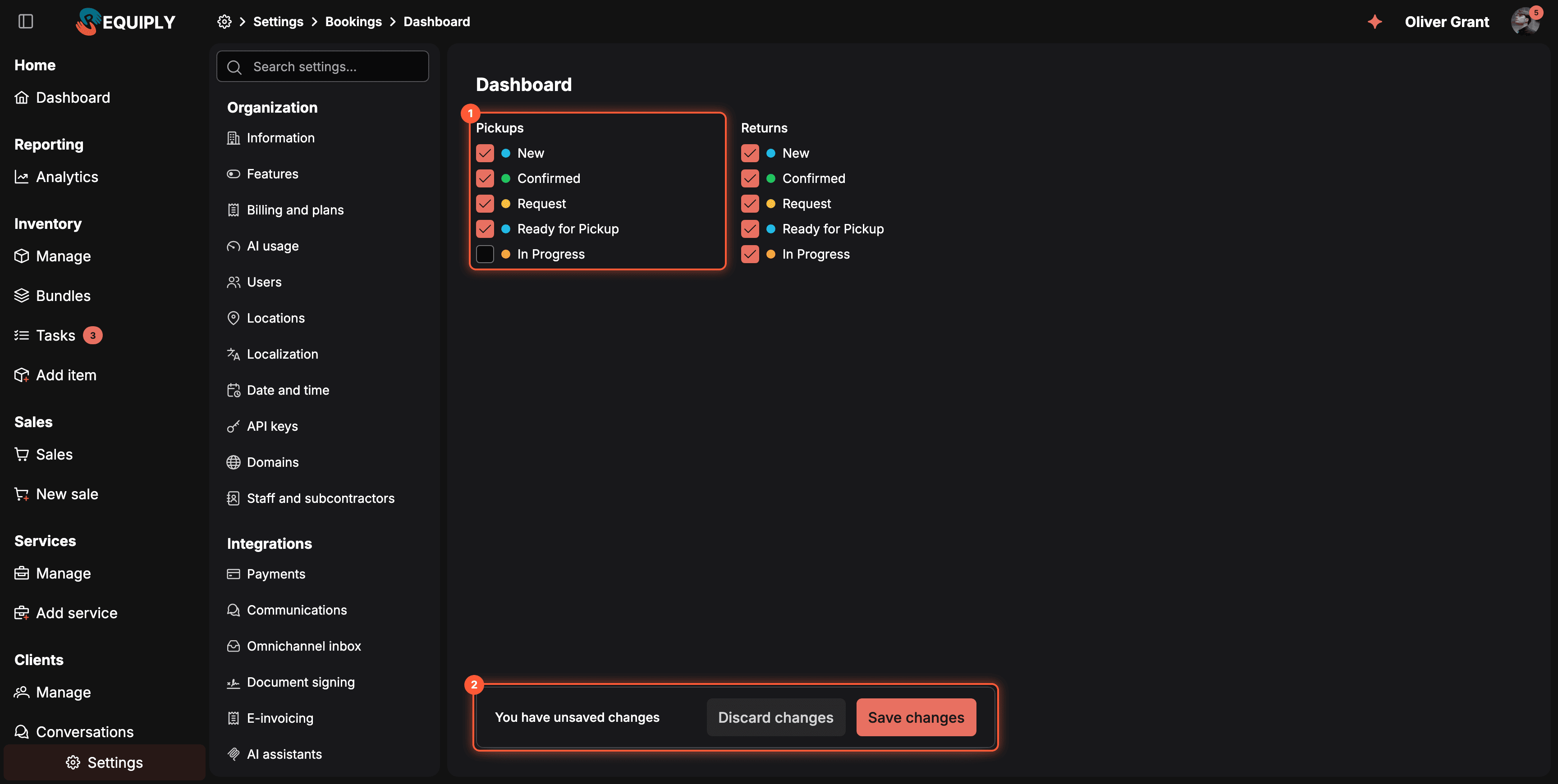
1: the statuses the Pickups list shows by default; here bookings already In Progress are left out. 2: saves the new default for the organization.
Choosing the default statuses
- Tick the statuses each list should show. Both columns list your statuses with the Active lifecycle from Booking statuses.
- Press Save changes in the bar at the bottom, or Discard changes to go back to the saved default.
- Each list keeps at least one status: the last ticked box cannot be cleared.
- With every status ticked, the list follows your statuses as they change: a new active status shows up in it automatically.
- Until you save anything here, both lists show every active status.
- The default applies to Pickups and Returns only. Overdue always lists every late booking.
How it combines with each person's choice
A member who changes the statuses with the filter button on the Dashboard sees their own choice instead, and the button carries a dot. Reset to default in that filter brings them back to the default saved here. The personal choice is remembered in their browser. See Choosing which statuses the lists show.
Common scenarios
Pickups shows only what still has to go out
Untick In progress under Pickups and save. Bookings your team has already handed out drop off everyone's Pickups list, so the card shows only the pickups still to prepare.
Returns ignores requests that never went out
Untick Request and New under Returns and save, so the list shows only bookings that were actually handed out or confirmed.
Deposits
Set the organization's security deposit policy: no deposit, a fixed amount, or a percentage of the rental, keep it out of online payments or include it, and override it per product.
Overview
How the rental catalog is structured: a category tree with subcategories, a description for every product, product specifications (custom fields) that customers can filter by on the client portal and your website, and client preferences, saved product filters you give to clients.